Transform Your Ecommerce Communication with WhatsApp API

Copied to clipboard!
In eCommerce, revenue is no longer driven only by traffic; in fact, it’s driven by how effectively you manage customer conversations across the buying journey.

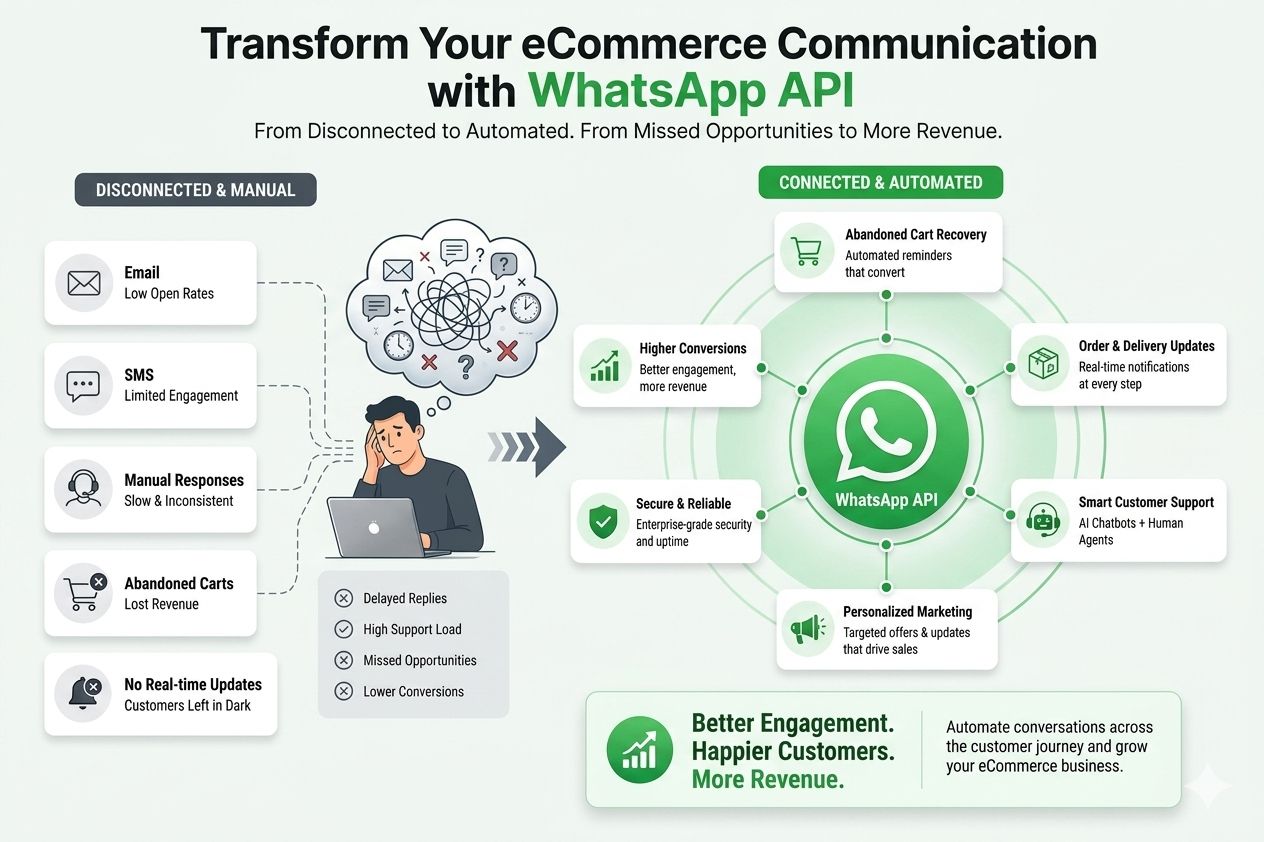
From abandoned cart reminders and order confirmations to shipping updates, return queries, and personalized offer alerts, every interaction shapes conversion and retention. The challenge? Most online stores still rely on disconnected channels like email and SMS that customers simply don’t engage with the same way.

This is where WhatsApp for ecommerce becomes a strategic advantage.

When implemented correctly, the WhatsApp Business API for ecommerce transforms how brands communicate at scale. It enables automated order updates, proactive delivery notifications, COD verification, abandoned cart recovery, and targeted WhatsApp marketing for e-commerce, all within the app that customers check multiple times a day.

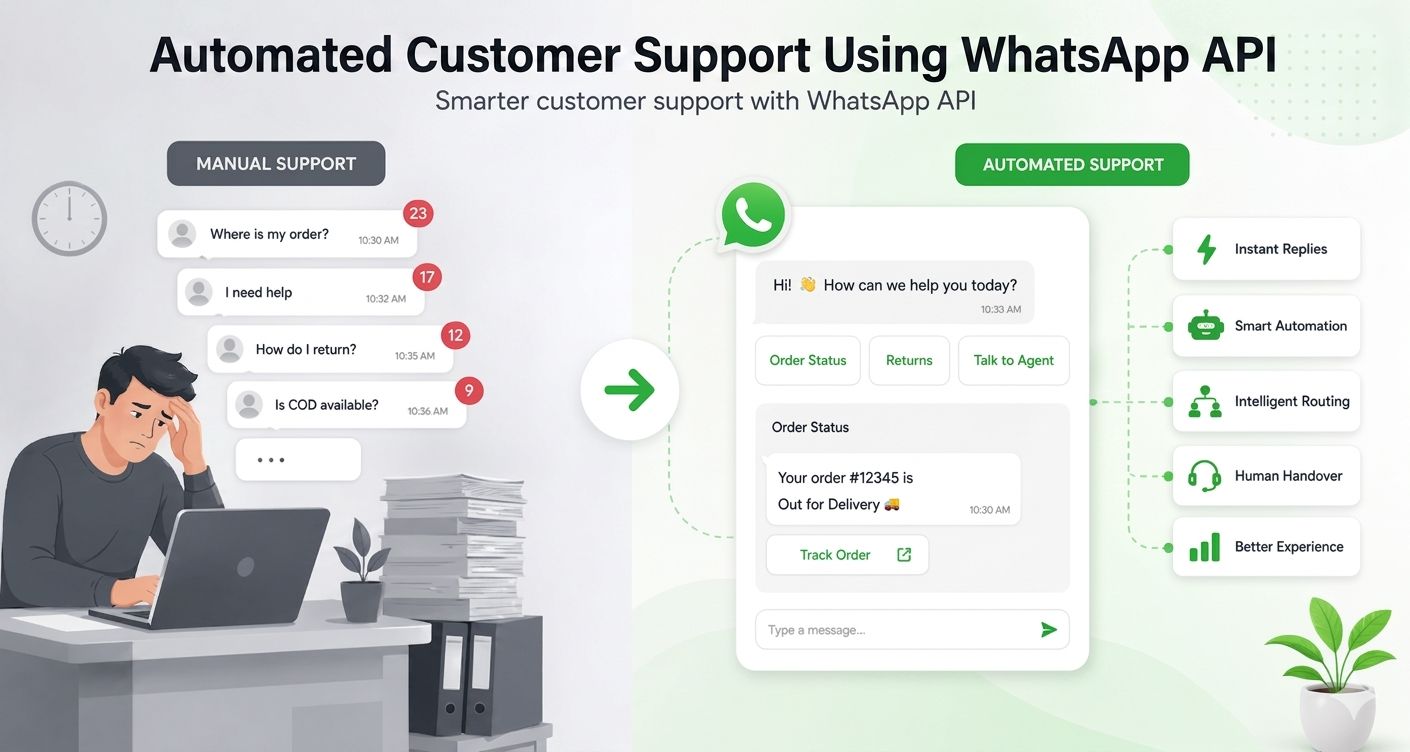
Beyond marketing, it reduces churn. Automated responses to FAQs, return policies, and order status queries significantly cut support workload while improving customer satisfaction. A well-implemented WhatsApp chatbot for e-commerce can handle high-volume repetitive queries, while your team focuses on high-impact conversations.

The result is not just better engagement, it’s higher conversions, stronger retention, lower operational costs, and a measurable competitive edge.

In this guide, we’ll break down how to integrate the WhatsApp API with your e-commerce website and use it strategically to drive real growth.

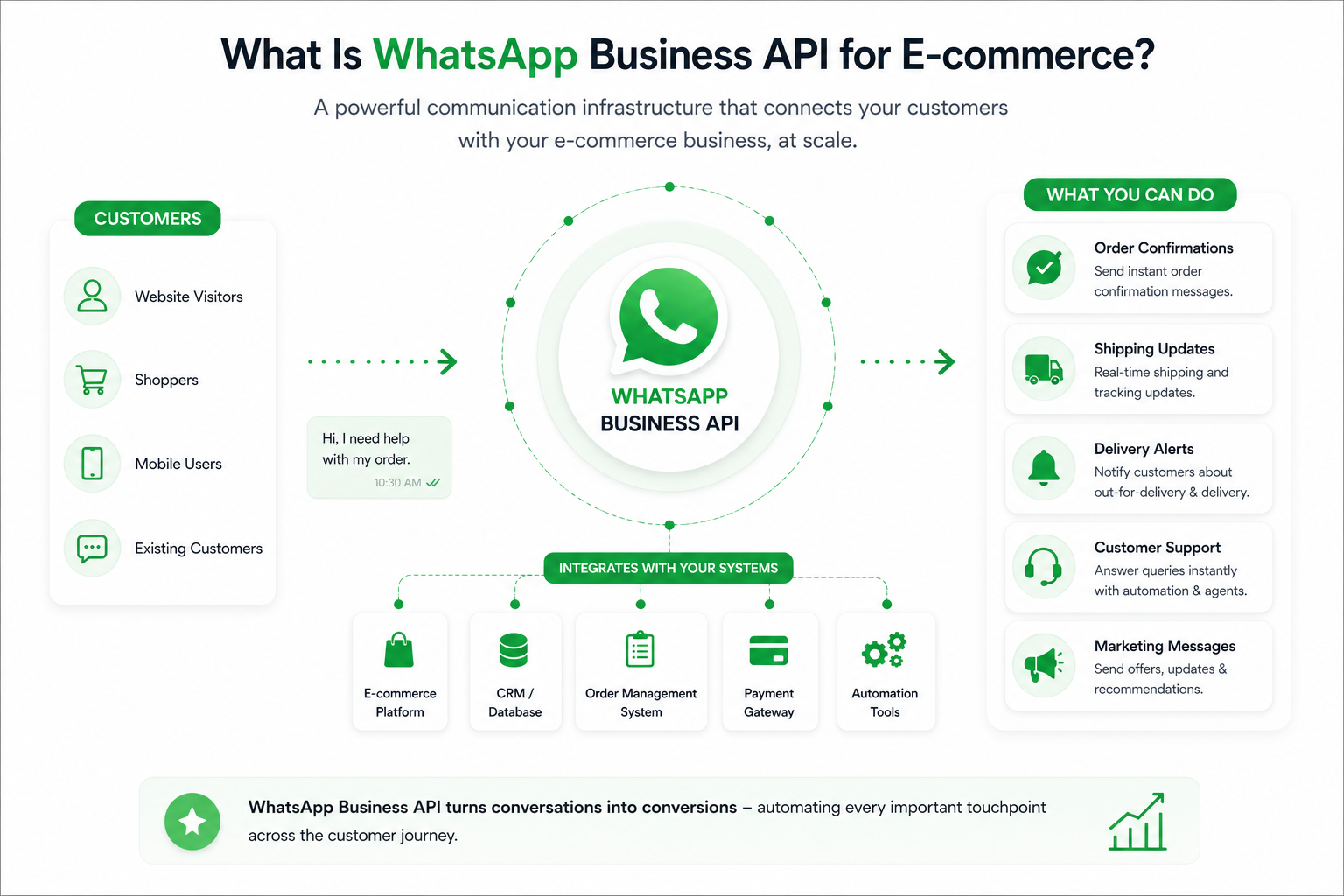
What Is WhatsApp Business API for E-commerce?

WhatsApp API for eCommerce

Many small sellers begin with the WhatsApp Business App to respond to customer queries manually. It’s useful in the early stages where you can create a catalog, set quick replies, and communicate directly with customers.

However, as order volumes grow, manual communication becomes a bottleneck. The app does not support advanced automation, multi-agent access, or deep integration with your e-commerce platform.

This is where the WhatsApp Business API for ecommerce becomes essential.

Unlike the basic app, the WhatsApp API allows businesses to integrate WhatsApp directly with their website, CRM, or store backend. This enables you to automate order confirmations, shipping updates, delivery alerts, abandoned cart messages, and even customer support workflows.

In short, it turns WhatsApp from a messaging tool into a scalable communication infrastructure for ecommerce operations.

Read our complete guide to explore the differences between WhatsApp Business and WhatsApp Business API.

Benefits of Integrating WhatsApp API with Your E-commerce Website

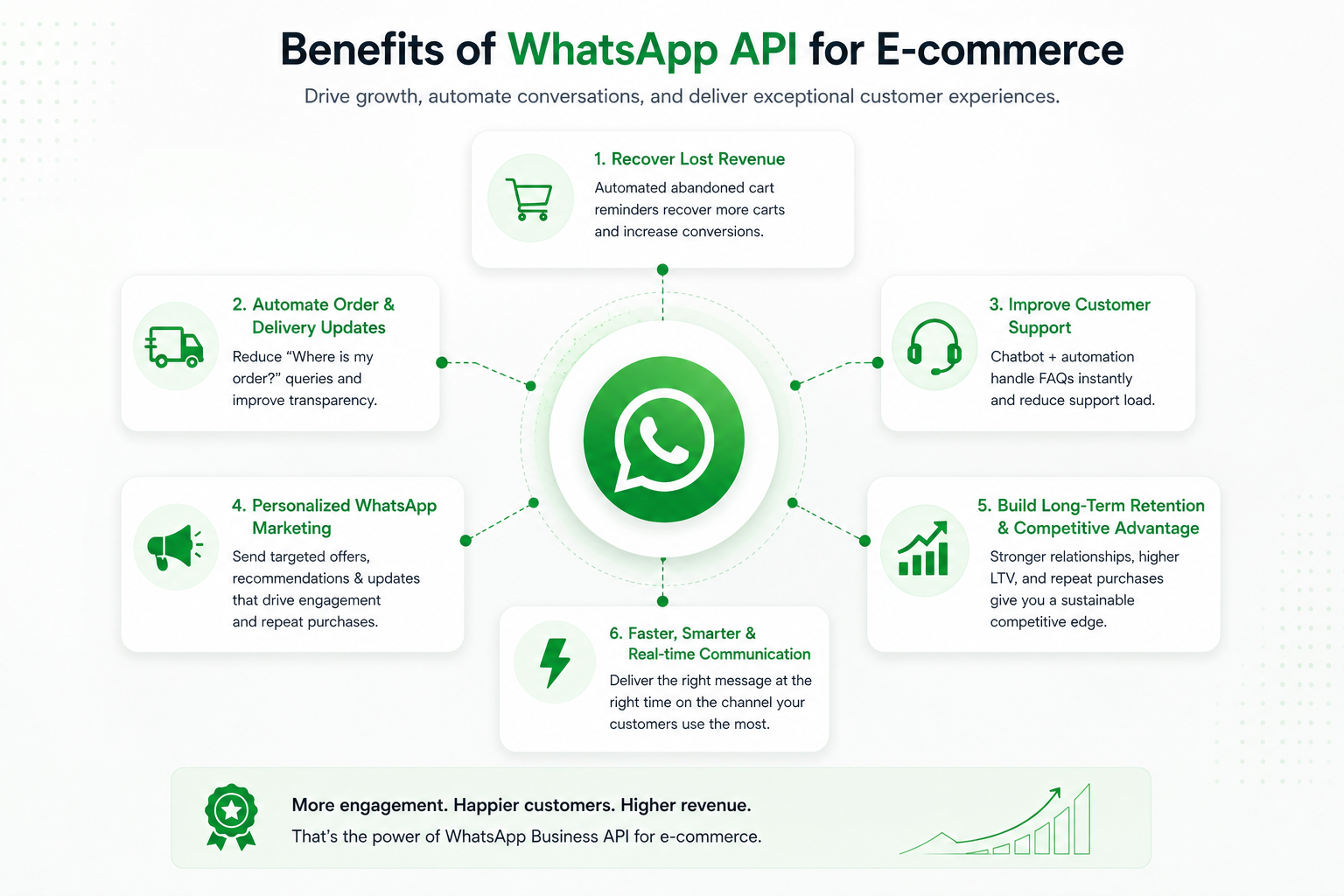
Benefits of WhatsApp API for eCommerce

Integrating WhatsApp API with your e-commerce website is not just about adding another communication channel; it’s about building a connected, automated customer journey from first visit to repeat purchase. Here’s what that looks like in practice.

1. Recover Lost Revenue with Abandoned Cart Automation

Cart abandonment is one of the biggest revenue leaks in e-commerce. With WhatsApp API for e-commerce automation, you can automatically trigger abandoned cart reminders within minutes of drop-off while purchase intent is still high.

Unlike email, WhatsApp messages are opened almost instantly. A timely reminder, possibly combined with a limited-time offer, can significantly improve recovery rates.

2. Automate Order & Delivery Updates (Reduce WISMO Queries)

A large portion of support tickets in ecommerce revolves around one simple question: “Where is my order?”

By integrating WhatsApp API in your website backend, you can automatically send:

  • Order confirmation messages
  • Shipping updates
  • Out-for-delivery alerts
  • Delivery confirmations

This reduces support workload, improves transparency, and enhances customer trust.

3️. Improve Customer Support with Automation + Chatbot

With a WhatsApp chatbot for ecommerce, you can instantly answer common queries such as:

  • Return and refund policy
  • Exchange process
  • Order status
  • Payment confirmation
  • Delivery timelines

Instead of hiring more agents as your store grows, WhatsApp Business API for ecommerce allows you to scale support intelligently, automation handles repetitive queries, and agents handle complex ones.

4️. Enable Personalized WhatsApp Marketing for E-commerce

When integrated properly, WhatsApp becomes a powerful lifecycle marketing channel. You can send:

  • Back-in-stock alerts
  • Personalized product recommendations
  • Festival or flash sale announcements
  • Cross-sell and upsell offers
  • Re-engagement campaigns

Because the communication happens in a conversational format, it feels less like advertising and more like assistance, leading to higher engagement and repeat purchases.

5️. Build Long-Term Retention & Competitive Advantage

E-commerce is not just about acquiring customers; it’s about retaining them. Sustainable growth comes from repeat purchases, not just first-time conversions.

By integrating WhatsApp API with your e-commerce website, you create a faster, more reliable, and highly personalized communication system. Customers receive instant updates, proactive engagement, and quick issue resolution all within an app they already use daily.

This consistent engagement strengthens brand trust, increases repeat purchase rates, improves customer lifetime value (LTV), and builds a long-term competitive advantage that email-only or SMS-only brands struggle to match.

Step-by-Step: How to Integrate WhatsApp API in Your Website

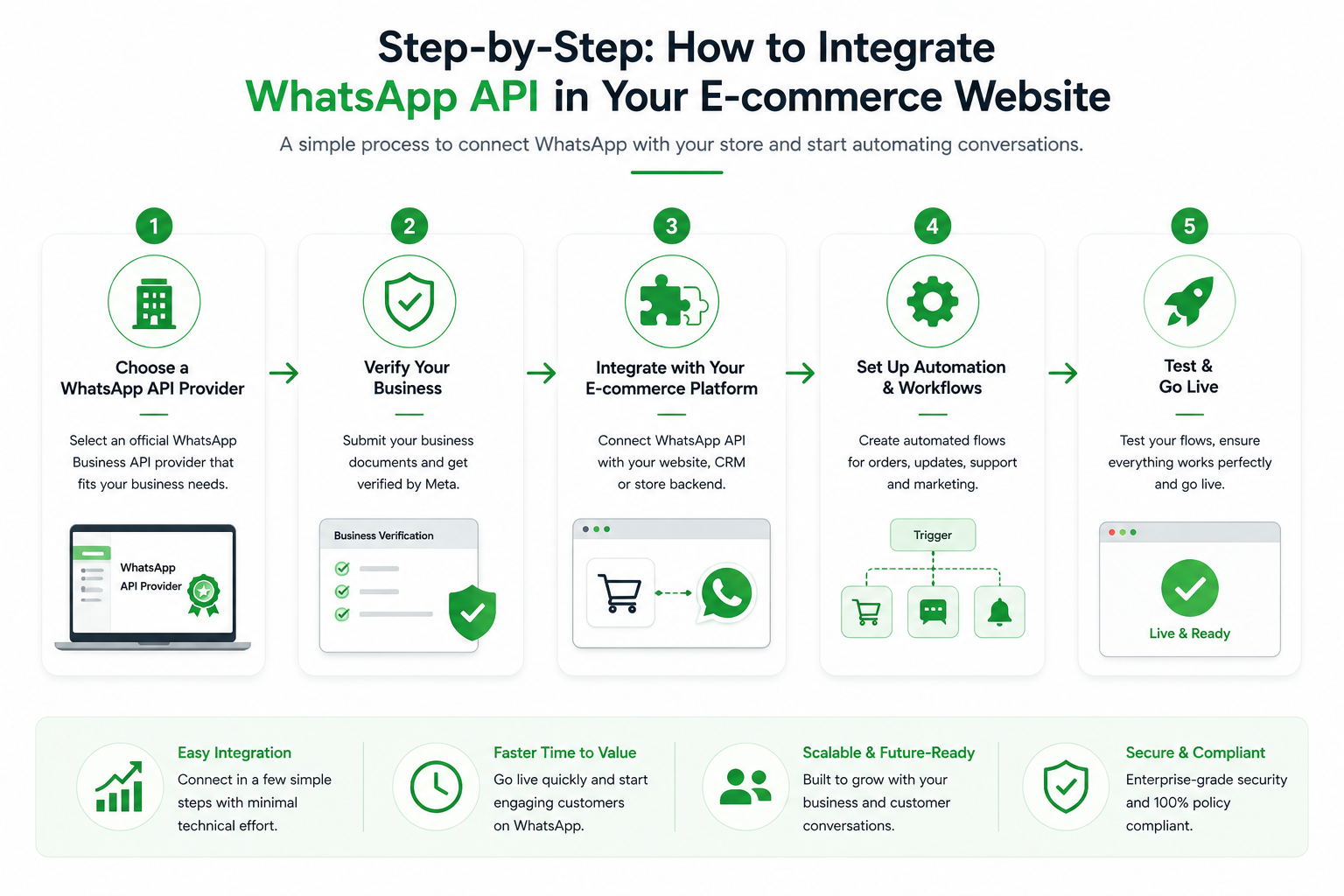
Steps to integrate WhatsApp API with your Business

Integrating WhatsApp API with your e-commerce website may sound technical, but when broken down into steps, the process is straightforward, especially if you’re working with the right WhatsApp Business API provider for ecommerce.

Step 1: Choose a WhatsApp Business API Provider

The first step in how to integrate WhatsApp Business API is selecting an official provider (also known as a Business Solution Provider or BSP).

Since direct access to WhatsApp API requires hosting infrastructure and approval from Meta, most e-commerce brands use a provider that:

  • Handles API setup and approval
  • Provides a dashboard for automation
  • Offers chatbot functionality
  • Supports campaign management
  • Enables multi-agent support

This step simplifies the entire WhatsApp API integration for ecommerce websites.

Step 2: Complete Business Verification & Number Approval

Your provider will help you:

  • Verify your Meta Business account
  • Register your phone number
  • Get your display name approved
  • Enable messaging limits

Once approved, your WhatsApp Business API becomes active.

Step 3: Connect WhatsApp API to Your E-commerce Platform

Now comes the actual integration.

Most modern providers offer plug-and-play integrations for major ecommerce platforms.

Integrate WhatsApp API with Shopify

If you're using Shopify, integration is usually app-based.

You typically:

  1. Install the provider’s Shopify app
  2. Connect your approved WhatsApp Business API account
  3. Enable automation triggers (order placed, order shipped, abandoned cart, etc.)
  4. Customize message templates

No heavy coding is required.

This makes WhatsApp API for ecommerce especially powerful for DTC brands using Shopify.

Integrate WhatsApp API with WooCommerce

For WooCommerce users:

  1. Install the WhatsApp integration plugin
  2. Connect API credentials (provided by your BSP)
  3. Configure webhook settings
  4. Map events like order confirmation, payment success, and delivery updates

WooCommerce allows flexible customization, making it ideal for brands wanting deeper automation workflows.

Integrate WhatsApp API with Magento

Magento integrations are usually module-based.

You will:

  • Install a compatible extension
  • Connect API credentials
  • Configure event-based triggers
  • Enable marketing and notification workflows

Magento’s flexibility allows advanced WhatsApp marketing for ecommerce, including segmentation and personalized campaigns.

Integrate WhatsApp API in a Custom Website

If your store is built on a custom tech stack:

  • Your developer will connect WhatsApp API via REST API
  • Webhooks will trigger messages based on user actions
  • Backend events (order placed, shipped, delivered) will send automated notifications

While this requires technical support, most providers offer documentation and onboarding assistance.

Step 4: Set Up Automation Workflows

Once integration is complete, the real value begins.

You can automate:

  • Order confirmations
  • Shipping updates
  • Delivery alerts
  • Abandoned cart reminders
  • COD verification
  • Review collection
  • Customer support via WhatsApp chatbot for ecommerce

This is where WhatsApp API for ecommerce automation transforms communication from manual effort into scalable infrastructure.

E-commerce Automation: What You Can Automate With WhatsApp API

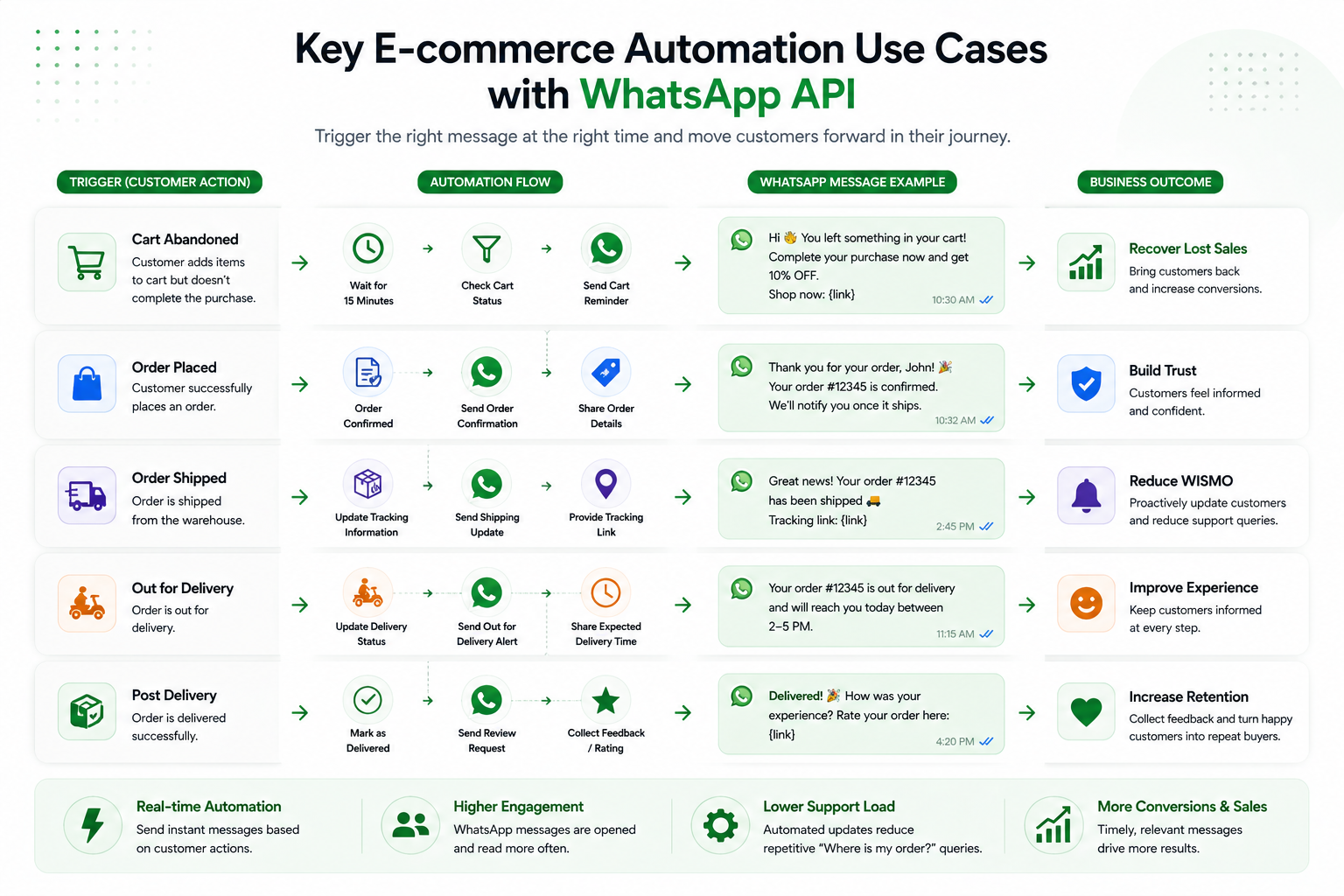
WhatsApp API usecases for ecommerce

Once you integrate WhatsApp API with your e-commerce website, the real advantage lies in automation. Instead of manually responding to customers, you build structured workflows that operate 24/7 across marketing, operations, and support.

Here’s what you can automate using WhatsApp API for ecommerce.

1. Abandoned Cart Recovery

Cart abandonment is inevitable, but revenue loss doesn’t have to be. With WhatsApp API for ecommerce automation, you can:

  • Trigger reminders within minutes of cart drop-off
  • Send personalized product images
  • Include direct checkout links
  • Offer limited-time discounts

Because WhatsApp messages are read almost instantly, recovery rates are significantly higher compared to traditional email reminders.

2. Order Confirmation & Real-Time Updates

Operational messaging is one of the most impactful use cases of WhatsApp for ecommerce. Automated workflows can send:

  • Order confirmation immediately after checkout
  • Payment success alerts
  • Shipping confirmation with tracking link
  • Out-for-delivery notification
  • Delivery confirmation

This reduces WISMO queries and improves customer trust.

3. Cash on Delivery (COD) Verification

For e-commerce businesses operating in markets where COD is common, fake or unconfirmed orders can increase return rates.

With WhatsApp Business API for ecommerce, you can:

  • Automatically send order confirmation messages
  • Ask customers to confirm their purchase
  • Reduce RTO (Return to Origin) losses

This directly improves operational efficiency.

4. WhatsApp Chatbot for E-commerce Support

A WhatsApp chatbot for ecommerce can handle repetitive customer queries such as:

  • “Where is my order?”
  • “What is your return policy?”
  • “How do I request a refund?”
  • “What are your delivery charges?”

Automation handles common queries instantly, while complex cases are transferred to human agents. This reduces support workload and improves response time.

5. Personalized WhatsApp Marketing for E-commerce

Beyond transactional messages, WhatsApp API enables lifecycle marketing automation.

You can automate:

  • Back-in-stock alerts
  • Price drop notifications
  • Product recommendations based on browsing behavior
  • Festival and flash sale announcements
  • Post-purchase cross-sell campaigns

Because the communication feels conversational rather than promotional, engagement rates tend to be significantly higher.

6. Post-Purchase Engagement & Review Collection

Retention is where real profitability lies.

With automated workflows, you can:

  • Send feedback requests after delivery
  • Collect product reviews
  • Offer loyalty discounts
  • Encourage repeat purchases

This strengthens customer lifetime value (LTV) and reduces churn.

When implemented strategically, WhatsApp API for ecommerce becomes more than a messaging solution; it becomes a full-funnel automation engine that supports acquisition, conversion, fulfillment, and retention.

Best Practices for Implementing WhatsApp Business API in E-commerce

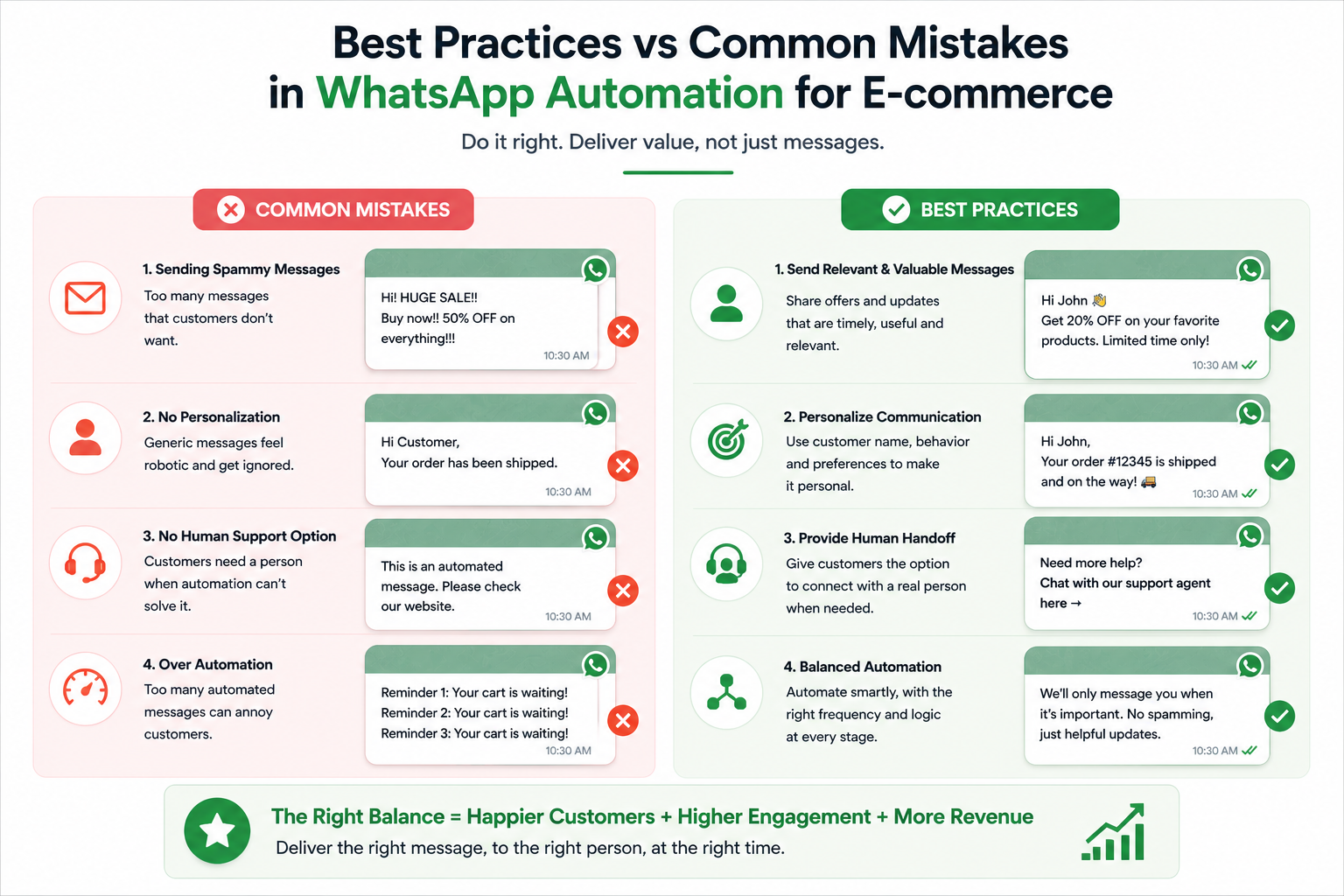
  1. Prioritize Personalization: Use customer data like purchase history and browsing behavior to send relevant, contextual messages instead of generic broadcasts.
  2. Maintain Message Discipline: Avoid over-messaging. Focus on value-driven communication such as order updates, useful reminders, and meaningful offers.
  3. Balance Automation with Human Support: Automate repetitive queries but ensure easy escalation to a live agent for complex issues.
  4. Use Rich & Interactive Messaging: Leverage product images, quick reply buttons, catalogs, and interactive messages to create a conversational shopping experience.
  5. Track & Optimize Performance: Monitor metrics like delivery rates, response time, click-through rates, and conversion rates to continuously refine your WhatsApp strategy.
Best Practices of WhatsApp API

Avoid Common Mistakes When Integrating WhatsApp API

While integrating WhatsApp API for e-commerce can significantly improve conversions and customer experience, poor implementation can reduce its effectiveness. Here are common mistakes ecommerce brands should avoid:

Treating WhatsApp Like Bulk SMS

WhatsApp is a conversational channel, not a spam broadcast tool. Sending too many promotional messages without proper segmentation or opt-in can:

  • Reduce engagement
  • Increase opt-outs
  • Risk account restrictions and health score

WhatsApp marketing for ecommerce works best when it is personalized, relevant, and timed correctly.

Ignoring Opt-In Strategy

Before sending marketing messages, customers must explicitly opt in. Smart ecommerce brands collect opt-ins via:

  • Checkout pages
  • Pop-ups
  • Account registration
  • Click-to-WhatsApp ads

Without a clear opt-in system, your WhatsApp API integration can face compliance issues.

Over-Automating Without Human Backup

Automation is powerful, but customers still expect human support when needed. A WhatsApp chatbot for e-commerce should handle FAQs and repetitive queries, but complex issues should be seamlessly transferred to live agents.

Not Segmenting Customers

Sending the same campaign to every customer reduces performance. With the WhatsApp API for ecommerce automation, you should segment users based on:

  • Purchase behavior
  • Engagement level
  • Order value
  • Interests

Conclusion 

Integrating WhatsApp API with your e-commerce website is not just a technical upgrade; it’s a strategic growth move. You’re tapping into a platform used by over 2 billion people globally, enabling real-time conversations that directly influence buying decisions.

From abandoned cart recovery and automated order updates to personalized WhatsApp marketing and scalable customer support, the WhatsApp Business API empowers e-commerce brands to build faster, smarter, and more engaging customer journeys.

If you're planning to integrate WhatsApp into your e-commerce operations, choosing a solution built specifically for e-commerce automation makes the transition seamless and results-driven.

QuickReply.ai helps ecommerce brands simplify WhatsApp API integration, automate lifecycle messaging, verify COD orders, recover abandoned carts, manage support conversations, and scale revenue-driven campaigns all from a single unified dashboard designed for growing online stores.

Book a free demo with QuickReply.ai today and see how WhatsApp automation can turn conversations into consistent revenue.

Turn 1 time visitor into repeat customer with WhatsApp marketing

Leverage the untapped growth potential of WhatsApp marketing to acquire and retain customers.

Frequently Asked Questions

Is WhatsApp API free for ecommerce businesses?

WhatsApp Business API is not completely free. Businesses are charged based on conversation categories (marketing, utility, authentication, service). Additionally, your WhatsApp API provider may charge platform fees.

Can I integrate WhatsApp API without coding?

Yes. Most official providers offer plug-and-play integrations for Shopify, WooCommerce, and other ecommerce platforms, making it possible to integrate the WhatsApp API in your website without heavy development.

How long does it take to integrate WhatsApp Business API?

If your business verification is complete, integration can typically be done within a few days, depending on the provider and platform.

Is WhatsApp suitable for small ecommerce stores?

Yes. While WhatsApp Business App works for very small stores, growing brands benefit significantly from upgrading to the WhatsApp Business API for e-commerce automation and scalability.

What can I automate using WhatsApp API for ecommerce?

You can automate:

  • Order confirmations
  • Shipping updates
  • Abandoned cart reminders
  • COD verification
  • Promotional campaigns
  • Customer support via chatbot