How to Set Up an Instagram Shop in 2026 and Use WhatsApp to Drive More Sales

Copied to clipboard!

Instagram has become an important product discovery channel for ecommerce brands. A customer can discover a product through a Reel, Story, creator post, ad, or product tag and start evaluating it without actively searching for the brand elsewhere.

An Instagram Shop makes this journey easier by giving businesses a storefront on Instagram where shoppers can browse products and move from content to product pages more quickly.

But discovery does not always result in an immediate purchase.

A shopper might want to ask about sizing, availability, delivery time, product variants, or simply need some reassurance before checking out. This is where connecting Instagram with WhatsApp can help turn product interest into a conversation and, eventually, a purchase.

In this guide, we will cover how Instagram Shops work in 2026, how to set one up, and how you can use Instagram and WhatsApp together to convert more shoppers.

What Is an Instagram Shop?

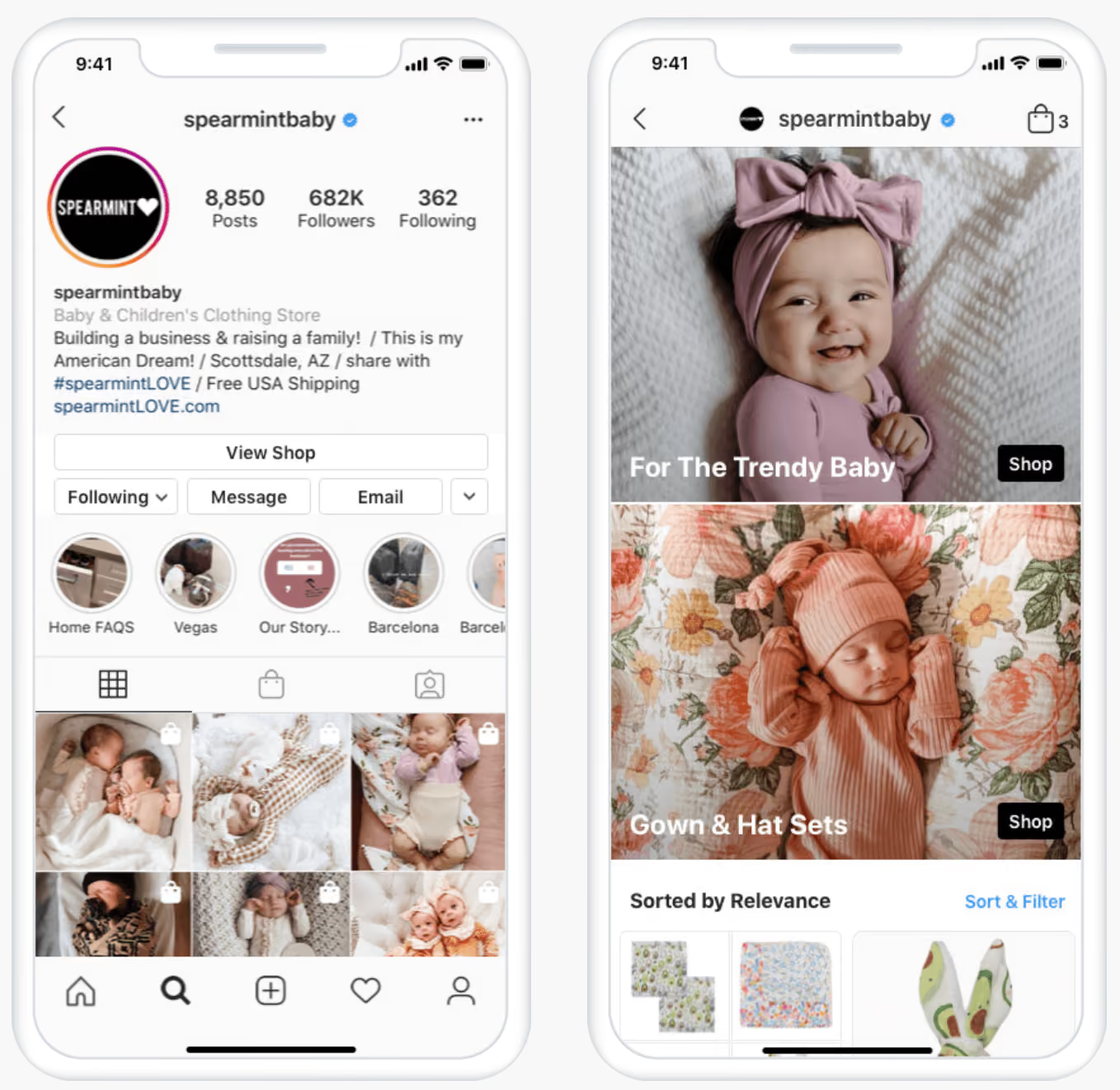
Instagram Account of a Baby and Children's Clothing Store

An Instagram Shop is a storefront connected to your Instagram business account. It allows customers to discover and browse products while interacting with your Instagram content.

Once your product catalog is connected, you can also tag products in eligible Instagram content such as posts, Stories, and Reels. This gives shoppers a shorter path from discovering a product to learning more about it.

There is one important change businesses should know about.

Instagram Shop checkout has changed

As of September 2025, Facebook and Instagram Shops use website checkout. This means customers can discover and browse products through Instagram, but when they are ready to purchase, they are directed to the merchant's website to complete the transaction.

So an Instagram Shop should not be treated as a replacement for your ecommerce website.

Instead, think of the journey as:

Instagram discovery → Product consideration → Website checkout

And for shoppers who need assistance:

Instagram discovery → WhatsApp conversation → Website checkout

That combination can help businesses support both self-serve shoppers and customers who prefer to speak with the brand before buying.

What Are the Benefits of an Instagram Shop?

1. Reduce the gap between discovery and shopping

Instagram is often where customers first discover a product.

Without shopping features, someone who sees an interesting product may need to visit the brand's profile, find the website, search for the product again, and then decide whether to purchase.

Product tags reduce some of these steps.

A shopper can tap a tagged product while viewing Instagram content and quickly access more information about it.

2. Turn your Instagram content into shoppable content

Your product catalog can become part of your Instagram content strategy.

Instead of posting a Reel or image and asking users to manually search for the product, eligible businesses can tag the relevant products directly.

Instagram supports product tagging across shopping content, including posts and Reels.

For example, a fashion brand could publish a Reel featuring three outfits and tag each product featured in the video.

The content creates interest, while product tagging provides the next step.

3. Give interested shoppers a clearer purchase path

Not everyone who engages with your Instagram content is ready to buy immediately.

However, when someone does show purchase intent, businesses should make the next action obvious.

Depending on the customer's needs, that action could be:

  • viewing the product
  • visiting the website
  • messaging the brand
  • starting a WhatsApp conversation
  • completing checkout

Instagram Shop, your ecommerce website, and WhatsApp can therefore work as different parts of the same customer journey.

How to Set Up an Instagram Shop in 2026

The exact setup screens can change depending on your market and ecommerce platform, but the overall process looks like this.

Step 1: Check whether your business is eligible

Before setting up Instagram Shopping, make sure your business meets Meta's commerce requirements.

Meta's current requirements include factors such as:

  • complying with Meta's policies
  • representing your business and domain
  • operating from a supported country
  • demonstrating trustworthiness
  • providing accurate information
  • selling products that are eligible under Meta's commerce policies

You should check Meta's latest eligibility requirements before starting because availability can vary by country and account.

Step 2: Use an Instagram professional account

Your business should have an Instagram professional account.

For most ecommerce businesses, this will be an Instagram Business account.

A professional account also gives you access to business tools such as advertising and performance insights.

Step 3: Connect your business assets

Make sure your Instagram business account is correctly connected to the Meta business assets required for your setup.

This typically includes your business portfolio and relevant Facebook assets.

It is also worth reviewing who has access to these assets before starting the setup process, especially if multiple employees or agencies manage your Meta account.

Step 4: Connect your product catalog

Your Instagram Shop needs a catalog containing the products you want customers to discover.

The catalog normally includes information such as:

  • product name
  • product images
  • description
  • price
  • availability
  • product URL

If your store is on Shopify

Shopify merchants can use Shopify's Facebook & Instagram sales channel to connect their store with Meta.

Once connected, Shopify can sync product information from your store with your Instagram storefront. Updates to product information can also flow through from Shopify, reducing the need to manage the same catalog separately.

Follow the setup flow inside your Shopify admin and Meta account, then submit the shop for review where required.

If you don't use Shopify

Follow Meta's current shop and catalog setup process for your ecommerce platform or business.

Step 5: Complete Meta's review process

Meta may review your account and catalog before shopping features become available.

Make sure your:

  • domain is correct
  • product information matches your website
  • catalog is complete
  • business information is accurate
  • products follow Meta's commerce policies

Incomplete or inconsistent product information can create unnecessary problems during setup.

Step 6: Start tagging products

Once your shop and catalog are available, start connecting products with the Instagram content customers already consume.

For example:

Reel: Show how a product looks or works and tag the product.

Story: Highlight a new launch, restock, or collection and make it easy for interested shoppers to explore it.

Feed post: Use lifestyle or product photography and tag the products shown in the image.

Product tags can turn ordinary Instagram content into a more direct product-discovery experience.

How to Get More Sales From Your Instagram Shop

Setting up the shop is only the beginning. The bigger question is how you turn Instagram attention into buying intent.

1. Use product tags where they naturally help

Do not tag products simply because the feature exists.

Use tags when the customer is likely to want more information about the product being shown.

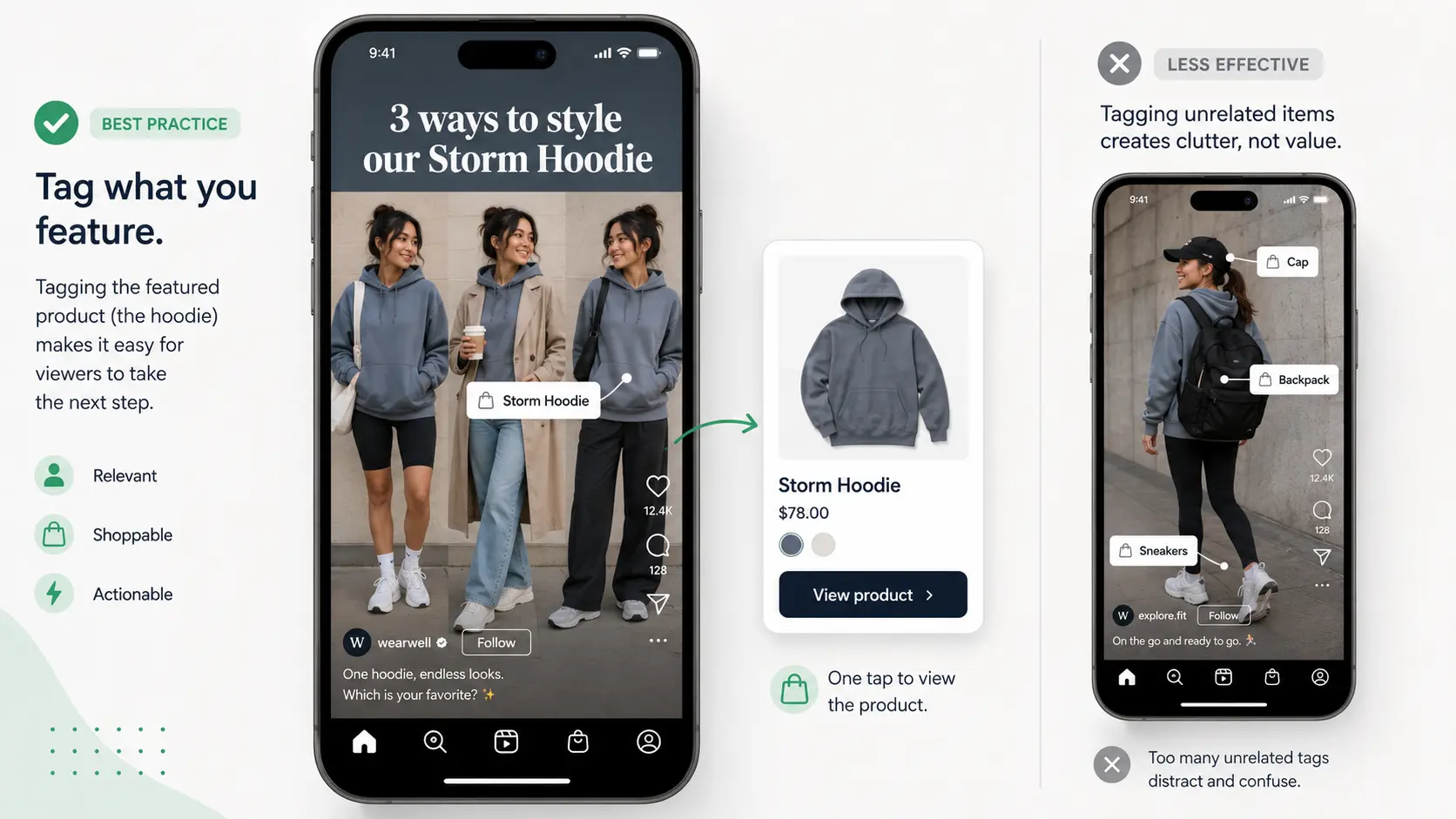
For example, if a Reel says: "3 ways to style our Storm Hoodie", tagging the Storm Hoodie gives interested viewers an immediate next step.

This is more useful than publishing a generic brand Reel and attaching several unrelated products.

Using product tags in the images

2. Use Reels and Stories for product discovery

Instagram is a visual platform, so your content should help customers understand the product rather than simply announce it.

Show things such as:

  • how the product looks in use
  • different variants
  • product benefits
  • styling ideas
  • before-and-after use cases
  • customer reviews
  • common questions
  • new launches and restocks

For many products, especially fashion, beauty, accessories, home, food, and lifestyle products, seeing the product in context can make it easier for customers to evaluate.

3. Use Instagram ads to reach shoppers beyond your followers

Instagram Ad of Luckyshrub

Organic content mainly depends on the audience Instagram decides to distribute it to.

Paid Instagram campaigns allow you to intentionally reach new or previously engaged audiences.

Businesses with eligible catalogs can also use product tags in Instagram ads, allowing customers to access product information from the ad experience.

However, not every Instagram ad needs to send customers directly to a product page.

For products where customers commonly have questions before buying, sending them into a conversation can also make sense.

This is where WhatsApp becomes useful.

How to Use Instagram and WhatsApp Together to Convert More Shoppers

Instagram is good at generating discovery and interest.

WhatsApp can help with the next stage of the journey when a customer wants to interact with the business.

Consider someone who discovers a pair of shoes through an Instagram Reel.

They like the product, but before buying they want to know:

  • Is size 9 available?
  • Will it fit wide feet?
  • Can it arrive before Friday?
  • Is another colour available?

Sending this shopper only to a product page may not resolve those questions.

Giving them the option to start a WhatsApp conversation can.

Add WhatsApp as a contact option from Instagram

If WhatsApp is an important sales or support channel for your business, make it easy for Instagram visitors to find it.

Depending on your account configuration, this could include adding WhatsApp as a contact option or using a WhatsApp link in your profile.

This gives high-intent visitors an alternative path when they want to speak to the business rather than browse independently.

The important part is what happens after they start that conversation.

Instead of treating WhatsApp simply as another support inbox, businesses can use it to help customers move forward.

For example:

Customer: Do you have this sneaker in size 9?

Brand: Yes. Size 9 is currently available in Black and White. Which colour would you like to see?

A simple conversation like this removes a purchase barrier that a landing page alone may not address.

What Are Click-to-WhatsApp Ads on Instagram?

Click-to-WhatsApp ads are Meta ads that can appear across properties such as Instagram and include a WhatsApp messaging action.

When someone clicks the ad, instead of being sent directly to a landing page, they can start a conversation with the business on WhatsApp.

The journey becomes:

Instagram Ad → WhatsApp conversation → Product discussion → Checkout

This can be useful when a purchase often requires some interaction before the customer is comfortable buying.

For example: A skincare brand runs an Instagram ad for a product range.

Instead of immediately asking every shopper to choose a product themselves, the CTA can encourage them to message the brand.

The conversation could begin with:

What are you looking to solve?

  • Dry skin
  • Acne
  • Pigmentation
  • Not sure

Based on the response, the customer can be guided towards relevant products.

The ad has therefore generated more than a website visit. It has started a direct conversation with a potential customer.

When Can Click-to-WhatsApp Ads Be Effective?

Click-to-WhatsApp campaigns can be particularly relevant when customers are likely to have questions before buying.

For example:

Products requiring recommendations

Beauty, fashion, wellness, electronics, and other categories often involve choosing between multiple products or variants.

WhatsApp gives brands an opportunity to guide shoppers rather than expecting them to figure everything out themselves.

Higher-consideration purchases

For expensive or complex products, customers may want reassurance before paying.

Starting a conversation can help answer objections around specifications, delivery, returns, compatibility, availability, or product suitability.

Businesses that depend on leads

The same approach also works outside ecommerce.

Education companies, healthcare businesses, real estate companies, travel businesses, and other lead-driven businesses can use Instagram ads to bring interested prospects into WhatsApp and continue qualification there.

The key is not simply sending ad traffic to WhatsApp.

The conversation that follows needs to be relevant and fast.

Build a More Valuable First-Party Audience From Instagram

There is another advantage to moving interested Instagram users into WhatsApp: the relationship does not have to end with the Instagram ad.

When brands run campaigns on Instagram, audience discovery and targeting largely happen within Meta's advertising ecosystem. Brands can define audiences and optimise campaigns, but they may still know relatively little about the individual shoppers who viewed or engaged with an ad.

Click-to-WhatsApp ads can help bridge this gap.

Once an interested shopper starts a WhatsApp conversation, the business can begin building a more direct relationship and understanding what that customer is actually interested in.

For example, imagine a footwear brand running an Instagram ad for running shoes.

A shopper clicks the ad and starts a WhatsApp conversation. Through that interaction, the brand may learn that the shopper:

  • is interested in running shoes
  • is looking for men's footwear
  • wears size 9
  • prefers a particular price range
  • viewed a specific product
  • has not yet completed a purchase

These signals can help the business understand customer intent much better than simply knowing that someone interacted with an Instagram campaign.

With the appropriate permissions and WhatsApp opt-in, businesses can use these signals to create more relevant customer segments and personalise future communication.

How WhatsApp Automation Can Improve the Instagram-to-WhatsApp Journey

Once Instagram-generated prospects start moving into WhatsApp, businesses need to do more than simply respond to messages.

They need to understand what each customer is interested in, respond quickly, guide them towards the right product or information, and capture useful signals that can support future segmentation.

As conversation volumes grow, doing all of this manually becomes difficult.

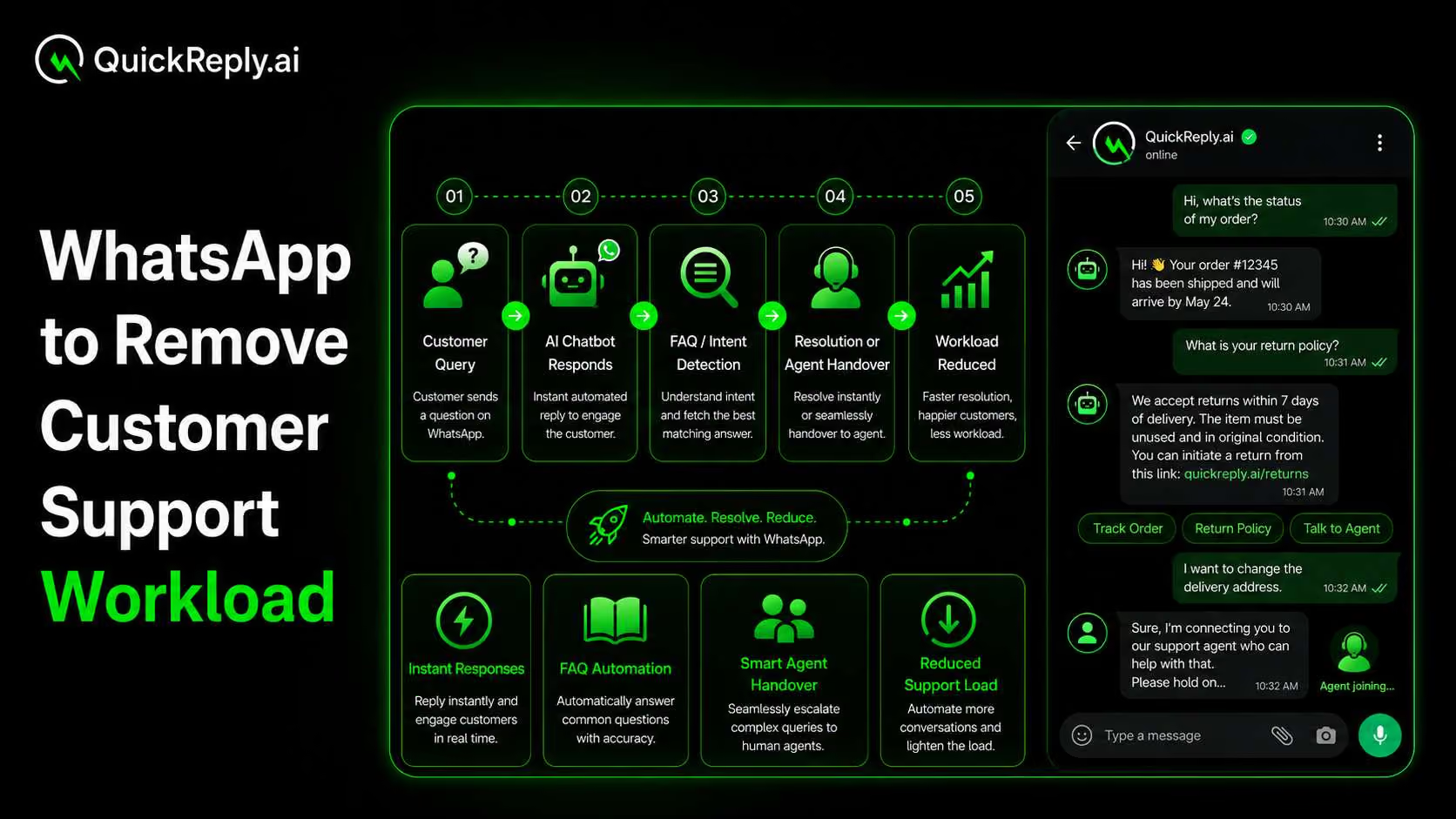
This is where WhatsApp automation can support the sales journey.

For example:

Instagram Ad

Customer clicks “Send WhatsApp Message”

WhatsApp conversation starts

Customer selects what they are interested in

Products or information are recommended

Customer receives a relevant purchase link

A sales agent takes over if needed

This allows straightforward questions to be handled quickly while keeping human agents available for conversations that genuinely need assistance.

The important part is to avoid automating the conversation simply for the sake of automation.

Customers coming from Instagram already have some context. The WhatsApp journey should continue that context instead of forcing them through an unrelated generic chatbot.

Can You Retarget Instagram Shoppers on WhatsApp?

The value of bringing an Instagram prospect into WhatsApp does not necessarily end with the first conversation.

If the customer has provided the necessary WhatsApp opt-in and messaging permissions, businesses can use the customer's previous interests and interactions to make future communication more relevant.

For example, someone who previously showed interest in running shoes could later be part of a segment receiving communication about:

  • a restock of the product they viewed
  • new running shoe launches
  • related products
  • an offer relevant to that product category
  • products based on their previous interests

This is very different from sending the same promotion to every Instagram follower.

An Instagram follower is not automatically a WhatsApp subscriber.

Businesses should only send proactive WhatsApp marketing messages when the required consent and platform requirements have been satisfied.

Once a customer has legitimately become part of the business's WhatsApp audience, their previous interactions can help create much more meaningful segments.

Instead of sending “New collection launched. Shop now.” to everyone, a brand can create more relevant communication based on customer segmentation and their journey.

This helps Instagram and WhatsApp work as connected parts of the customer journey rather than two separate marketing channels.

Turn Instagram Interest Into WhatsApp Conversions

Instagram can help you get discovered. But discovery alone does not guarantee a sale.

The real opportunity is to give interested shoppers a clear next step when they are ready to ask a question, explore a product, or make a purchase.

By connecting Instagram with WhatsApp, businesses can move shoppers from passive engagement to direct conversations, understand their intent, recommend relevant products, and guide them towards checkout.

With QuickReply.ai, businesses can automate and scale this journey using WhatsApp automation, customer segmentation, personalised product recommendations, follow-ups, and agent-assisted conversations.

Instead of treating Instagram as just another awareness channel, brands can use it as the starting point for more personalised conversations and higher-intent customer journeys on WhatsApp.

Turn 1 time visitor into repeat customer with WhatsApp marketing

Leverage the untapped growth potential of WhatsApp marketing to acquire and retain customers.

Frequently Asked Questions

Is Instagram Shop still available in 2026?

Yes. Eligible businesses can still use Instagram Shopping features to showcase products, maintain a product catalog, and make eligible content shoppable.

However, Meta changed checkout for Facebook and Instagram Shops in September 2025. Customers now complete purchases on the merchant’s website rather than through native Shop checkout.

This change is separate from Facebook Marketplace, which continues to operate as a marketplace where users can discover, list, buy, and sell items.

Do I need a website for an Instagram Shop?

Businesses need to meet Meta's commerce eligibility requirements, which include representing their business and domain. Customers are now directed to the merchant website for checkout.

Can I connect Shopify to Instagram?

Yes. Shopify provides a Facebook & Instagram sales channel that can connect eligible Shopify stores with Meta and sync product catalog information.

Can you tag products in Instagram Reels?

Yes. Eligible businesses and creators can tag products in Instagram Reels. Meta currently allows businesses and creators to tag products or collections when creating eligible Reels.

Can Instagram ads open WhatsApp?

Yes. Meta supports ads that click to WhatsApp. These ads can include a WhatsApp CTA that takes the customer from the ad into a WhatsApp conversation with the business.