WhatsApp Commerce: How to Personalize the Ecommerce Shopping Experience

Copied to clipboard!

Online shopping gives customers convenience, choice, and access to thousands of products. But it often lacks one thing that physical retail does naturally, which is personalized assistance.

In a store, a shopper can ask a salesperson which size would fit better, which product suits their needs, whether another colour is available, or when an item can be delivered.

On an ecommerce website, shoppers are often left to figure these things out on their own.

This is where WhatsApp can make the shopping experience more personal.

By connecting WhatsApp with your ecommerce store, customer data, product catalogue, and automation workflows, brands can assist shoppers throughout the purchase journey, from discovering the right product to receiving order and delivery updates.

In this blog, we will look specifically at how ecommerce brands can use WhatsApp to personalize the shopping experience while a customer is actively considering and completing a purchase.

What Does Personalizing the Ecommerce Shopping Experience With WhatsApp Mean?

Personalizing the ecommerce shopping experience with WhatsApp is not simply about addressing customers by name or sending different messages to different segments.

It means making the WhatsApp interaction relevant to what the customer is doing at that particular point in their purchase journey.

A shopper who is still considering what to buy needs a different kind of interaction from someone who is ready to pay. Similarly, a customer who has already placed an order does not need product discovery assistance; they need confirmation, delivery information, or help with their order.

This means personalization can come from three things:

Context

WhatsApp interactions can use information already available from the ecommerce journey, such as the product or collection being viewed, items selected, order details, or customer information.

This reduces the need for customers to repeatedly explain what they are doing or what they need.

Timing

The assistance should match the customer's current stage.

Before purchase, that might mean helping them make a decision. At checkout, it could mean answering a delivery or payment question. After the transaction, it could mean sending the correct order status or invoice at the right time.

Relevant next actions

Personalization also means giving customers useful actions based on their situation.

Instead of sending every customer the same generic message, WhatsApp could surface the next step that matters to them, whether that is viewing a recommendation, completing payment, tracking an order, or getting help with delivery.

So, WhatsApp chat assistant creates a more contextual layer around the shopping journey, allowing the conversation to change as the customer's needs change.

How Does the Website-to-WhatsApp Shopping Experience Work?

WhatsApp does not work like a conventional chatbot embedded inside an ecommerce website.

A WhatsApp widget or button on the website acts as an entry point into the conversation. When a shopper clicks it, the conversation continues in WhatsApp, through the app or web interface depending on how they are accessing it.

From there, the customer can interact with the brand's WhatsApp shopping assistant without having to remain on the website.

For example, someone browsing running shoes on an ecommerce store could click Chat on WhatsApp to ask which model would suit them. Inside the WhatsApp conversation, the assistant could:

  • understand what the shopper is looking for
  • ask relevant follow-up questions
  • recommend suitable products
  • answer questions about size, availability, specifications, or delivery
  • share a link to the relevant product or checkout page when the shopper is ready to purchase

The customer can then return to the ecommerce checkout through that link and complete the transaction.

This means the ecommerce website and WhatsApp play complementary roles. The website remains the primary place for browsing products and completing structured actions such as checkout, while WhatsApp provides a separate conversational interface when the shopper needs more personalized assistance.

Another important difference from a website chatbot is that the conversation can continue even after the shopper leaves the website. With the appropriate opt-in, a brand can later send relevant WhatsApp messages such as a cart reminder or a back-in-stock notification.

How to Use WhatsApp to Personalize the Ecommerce Shopping Experience

WhatsApp can play different roles as a shopper moves through an ecommerce purchase journey.

Before checkout, it can help customers discover and evaluate products. As they move closer to purchase, it can resolve checkout or payment friction. If the customer leaves without buying, WhatsApp can help continue the journey later. Once an order is placed, it can provide personalized order and delivery communication.

1. Help Shoppers Find the Right Product

Ecommerce websites already make it easy to browse categories, search for products, and filter by attributes such as price, size, colour, or brand.

WhatsApp becomes useful when a shopper's requirement is more specific than those filters can easily capture.

For example, a customer browsing an apparel store may already be looking through the Occasion Wear category but still need help finding:

Something minimal for a daytime wedding under ₹5,000.

A WhatsApp shopping assistant can ask a few relevant questions about the occasion, style, budget, or preferences and recommend a smaller set of suitable products directly in the conversation.

The same approach can work across different ecommerce categories:

  • Beauty: “I need a lightweight moisturizer for oily skin.”
  • Electronics: “I need a laptop under ₹80,000 for video editing.”
  • Furniture: “I need a compact dining table for a small apartment.”
  • Jewellery: “I need an anniversary gift under ₹15,000.”

Instead of asking shoppers to translate these requirements into multiple filters, WhatsApp allows them to explain what they need naturally.

When they find something they like, they can follow the product or checkout link from the WhatsApp conversation back to the ecommerce store.

2. Help Shoppers Make the Right Product Decision

Finding a relevant product does not always mean the shopper is ready to buy it.

They may still need help deciding whether the product is actually right for them.

This is where WhatsApp can work like an online store associate by answering questions specific to the shopper, the product, or their intended use.

For an apparel shopper, that could mean:

  • Is this true to size?
  • Is the fabric stretchable?
  • Will this work for a formal event?
  • Is there a similar design with sleeves?
  • Is this available in another colour?

For beauty, questions may relate to skin type, ingredients, shade, or how the product fits into an existing routine.

For electronics, the concern may be compatibility or specifications:

Will this charger work with my phone?

Which of these two laptops is better for video editing?

WhatsApp can also make product comparisons more useful by focusing on what matters to that particular shopper.

For example:

Customer: Which of these two headphones should I buy for travelling?

Assistant: If travel is your priority, Product B would be the better fit because it offers stronger noise cancellation and longer battery life.

The conversation can also continue when the shopper's preferred option is unavailable.

Suppose a customer wants a black shirt of medium size, but that variant is out of stock. WhatsApp could recommend the same design in another colour or suggest similar black shirts available in medium size.

But the shopper may not always want an alternative.

In that case, the brand can give them the option to receive a back-in-stock alert on WhatsApp. Once the preferred product or variant becomes available again, the shopper can receive a relevant message with a direct link back to the product page.

This allows the brand to remember what the shopper was interested in and reconnect when the purchase becomes possible.

3. Assist Shoppers at Checkout and Payment

Even after choosing a product, customers can hesitate before completing checkout.

At this stage, their questions are usually less about the product itself and more about completing the purchase.

They may want to know:

  • When will this arrive?
  • Is Cash on Delivery available?
  • Is shipping free?
  • Can I use a particular coupon?
  • Does this ship to my location?
  • Can I return the product?
  • Is gift wrapping available?
  • Which payment methods can I use?

These questions can be particularly important for time-sensitive purchases.

For example:

Customer: I need this before Saturday. Can it reach Gurgaon in time?

Assistant: Delivery to your PIN code currently takes 2–3 business days. If you order today, the estimated delivery date is Friday.

Once the shopper is ready to buy, WhatsApp can help move them back into the transaction.

Depending on the ecommerce and payment setup, brands can use WhatsApp to:

  • Share product or checkout links
  • Share or resend payment links
  • Provide payment instructions
  • Answer payment-related questions
  • Confirm successful payment
  • Help shoppers continue after a failed payment attempt

For example, after a customer selects a recommended product in the WhatsApp conversation, the assistant can share a checkout link that takes them back to the ecommerce store to complete the purchase.

The objective is not to recreate the entire checkout inside the conversation. It is to make it easier for the shopper to move from assistance on WhatsApp to completing the transaction.

4. Bring Back Shoppers Who Leave Without Completing Their Purchase

WhatsApp Message to Complete the Purchase

Not every customer who adds a product to the cart or reaches checkout completes the purchase in the same session.

They may get distracted, want more time to decide, encounter a payment issue, or simply leave the website.

This is another place where WhatsApp differs from a conventional website chatbot.

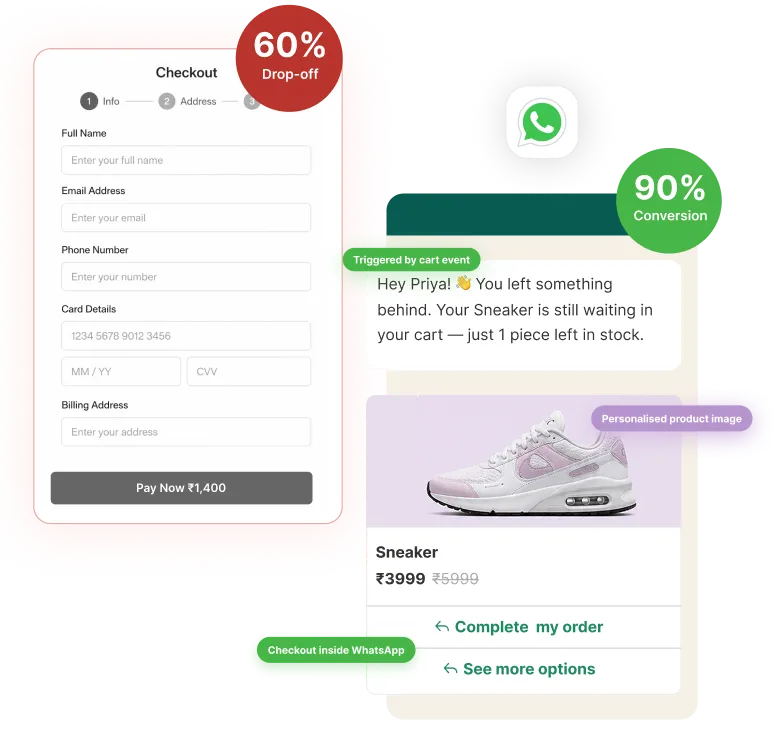
Once the shopper leaves the website, an embedded chatbot can no longer continue the interaction. WhatsApp, however, can allow the brand to reconnect with an opted-in shopper later.

For example, an abandoned cart message could remind them about the exact product they left behind:

You still have the Storm Hoodie in Navy, Size M in your cart. Ready to complete your order?

The message can include a Complete Purchase button or checkout link that takes the shopper directly back to the relevant cart or checkout page.

The reminder can also preserve useful context such as:

  • Products left in the cart
  • Selected size or variant
  • Cart value
  • Checkout link

This makes abandoned cart recovery part of the same personalized purchase journey. Instead of asking the shopper to start again, WhatsApp helps them continue from where they stopped.

5. Personalize the Order Confirmation Experience

Once the order is placed, the customer's immediate need changes from assistance to reassurance.

They want to know:

  • Did my order go through?
  • Was my payment successful?
  • Did I select the correct product or variant?
  • When will the order arrive?

WhatsApp can provide an immediate confirmation containing information specific to the customer's purchase, such as:

  • Order number
  • Products purchased
  • Quantity
  • Size, colour, or other variant
  • Amount paid
  • Payment status
  • Delivery address
  • Estimated delivery date

Brands can also make the invoice or detailed order information accessible directly from the conversation.

Instead of sending only, "Your order has been confirmed", the message can provide useful context:

Your order #QR1024 is confirmed. You ordered the Storm Hoodie in Navy, Size M. Your estimated delivery date is August 16.

This gives customers a clear record of what they purchased and what happens next.

6. Keep Customers Updated Throughout Fulfilment

After placing an order, customers often repeatedly check the ecommerce website, email, or courier tracking page to see where their purchase is.

WhatsApp can proactively bring those updates to the customer. Brands can send relevant updates when:

  • Payment is confirmed
  • The order is packed
  • The shipment is dispatched
  • The package reaches a delivery hub
  • The order is out for delivery
  • The order is delivered

These messages can contain information specific to the customer's order.

For example: "Your order #QR1024 has been shipped via XYZ Logistics and is expected to arrive on August 16".

The message can also provide a direct option to track the shipment.

This is another advantage of WhatsApp being a separate messaging channel rather than only an interaction available while the customer is on the website. The brand can keep the customer informed throughout fulfilment without requiring them to repeatedly return and check for updates.

7. Let Customers Take Action on Delivery Updates

Order updates become even more useful when customers can act on them.

Consider an out-for-delivery message.

A basic notification might only say: Your order is out for delivery.

A more interactive WhatsApp message can also provide options such as:

  • Track Order
  • Get Delivery Help
  • Contact Support

Depending on the logistics setup, customers may also be able to:

  • share delivery instructions
  • resolve an unsuccessful delivery attempt
  • request another delivery date
  • update certain delivery details

This is where WhatsApp goes beyond simply sending notifications.

It provides a persistent conversational channel through which the customer can continue managing parts of their purchase even after leaving the ecommerce website.

Across the complete journey, WhatsApp can therefore act as a shopping assistant while customers choose, a purchase assistant while they complete checkout, a re-engagement channel when they leave without buying, and a personalized transactional channel once the order is placed.

Best Practices for Personalizing the Shopping Journey on WhatsApp

Personalization should make the shopping journey easier for the customer. When designing WhatsApp experiences around an ecommerce purchase, keep these principles in mind.

1. Maintain Continuity Between the Website and WhatsApp

The website and WhatsApp are separate interfaces, but the customer's experience should feel connected.

If a shopper opens WhatsApp from a particular product, collection, cart, or checkout stage, carry that context into the conversation wherever possible. Similarly, when WhatsApp sends the shopper back to a product or checkout page, direct them to the relevant point in their purchase journey rather than making them start again.

The customer may move between the ecommerce website and WhatsApp several times before completing a purchase. Each transition should preserve as much useful context as possible.

2. Minimize the effort required from the shopper

Conversational commerce works best when it reduces the number of steps required to make a decision or complete a purchase.

Ask only for information that is necessary. If details are already available through the shopper's browsing activity, cart, customer profile, or order, use that context instead of requesting it again.

The interaction should feel faster and easier than searching through multiple pages for the same information.

3. Keep commerce data accurate and up to date

Personalization is only useful when the information behind it is reliable.

WhatsApp experiences should work with current ecommerce data such as:

  • Product availability
  • Sizes and variants
  • Prices
  • Cart and order information
  • Payment status
  • Estimated delivery information
  • Shipment status

Recommending an out-of-stock product, showing an incorrect price, or providing outdated delivery information can create more friction than the personalized experience removes.

4. Design for assisted commerce, not just automation

Not every purchase journey needs to be fully automated.

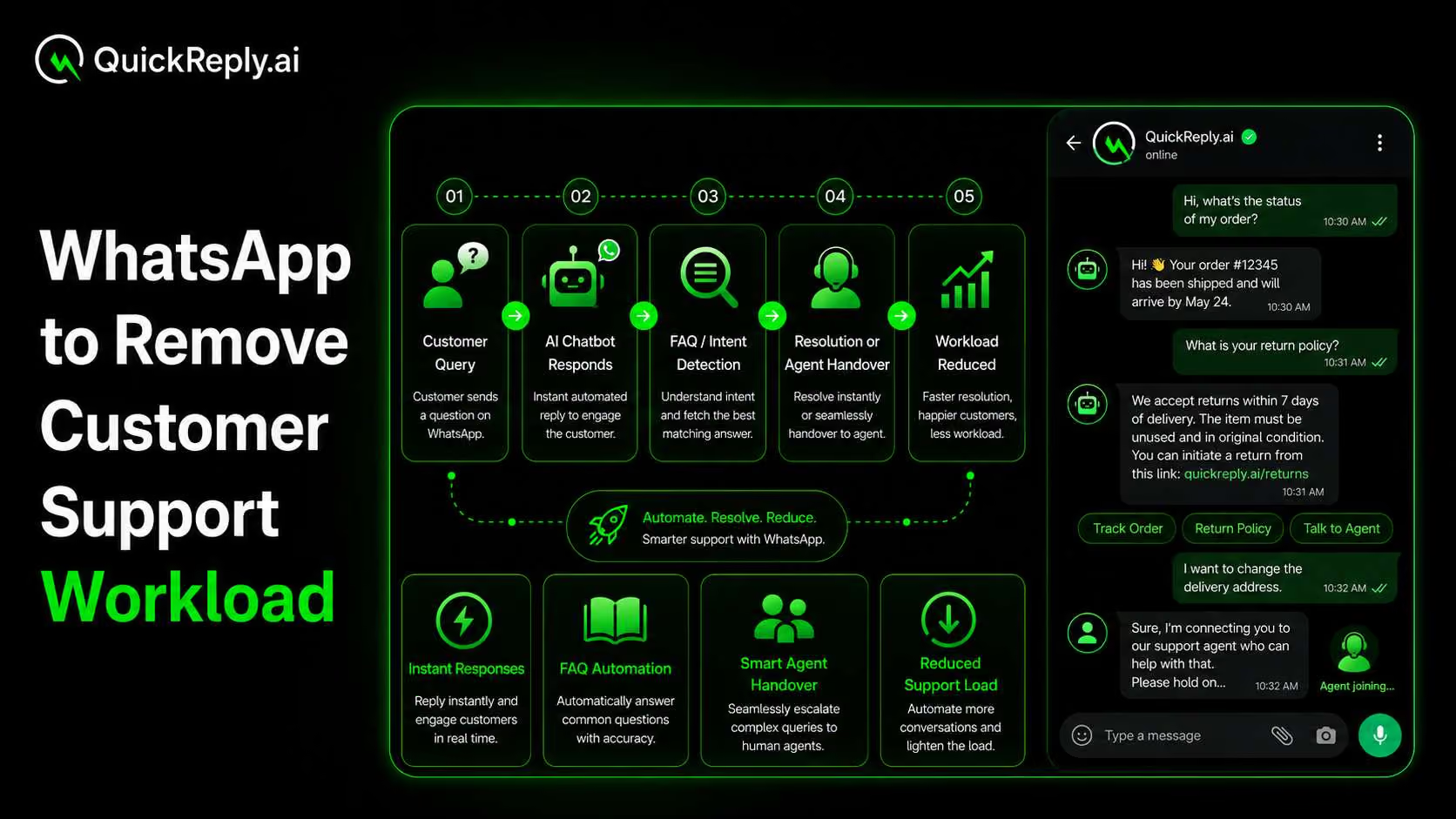
AI-powered shopping assistants can handle product discovery, recommendations, comparisons, common purchase questions, and other repeatable interactions. But high-consideration or complex purchases may sometimes benefit from human input.

When that happens, the shopper should be able to continue with a human representative without losing the context of the conversation.

The objective is not to automate every interaction. It is to use the right level of assistance to help the shopper progress towards a purchase.

5. Measure whether WhatsApp is improving purchase outcomes

A successful personalized shopping experience should not be judged simply by how many WhatsApp conversations it generates.

Measure whether those interactions actually help shoppers move forward.

Depending on the experience, relevant metrics can include:

  • Clicks on recommended products
  • Conversation-to-order conversion
  • Assisted conversions
  • Checkout completion
  • Payment completion
  • Revenue generated through assisted journeys
  • Interactions with order and delivery updates

Ultimately, the goal is not to create more conversations on WhatsApp. It is to use those conversations to remove friction and make the ecommerce purchase journey more relevant and convenient.

Turn WhatsApp Into a Personalized Shopping Layer With QuickReply.ai 

From helping a shopper choose between two products to answering a last-minute delivery question, recovering a payment, confirming an order, or sharing its delivery status, WhatsApp can support multiple moments within a single purchase journey.

But creating this experience requires more than simply adding a WhatsApp button to an ecommerce store.

WhatsApp needs to understand the context behind the conversation: what the shopper is looking at, what products are available, what they have ordered, where their payment stands, and when human assistance is required.

That is where QuickReply.ai comes in.

QuickReply.ai connects WhatsApp with your Shopify store and commerce data, enabling brands to build experiences such as conversational product discovery, personalized recommendations, AI-powered shopping assistance, checkout and payment journeys, transactional updates, shipment communication, and seamless agent handover.

Instead of treating WhatsApp as a separate messaging channel, you can make it an interactive part of the shopping experience itself, helping customers from the moment they need assistance choosing a product to the moment their order reaches them.

Turn 1 time visitor into repeat customer with WhatsApp marketing

Leverage the untapped growth potential of WhatsApp marketing to acquire and retain customers.

Frequently Asked Questions

How can WhatsApp personalize the ecommerce shopping experience?

WhatsApp can personalize the shopping experience by using context from a customer's purchase journey to provide relevant assistance. This can include helping them choose products, answering product-specific questions, assisting with checkout or payment, and sending order and delivery updates based on their actual purchase.

What role does WhatsApp play when customers are already scrolling on an ecommerce website?

WhatsApp can add conversational assistance when shoppers need more help, such as choosing between products, checking compatibility or availability, confirming a delivery timeline, or resolving a payment issue.

Can WhatsApp be used as an AI shopping assistant?

Yes. An AI-powered WhatsApp shopping assistant can understand a shopper's requirements, recommend relevant products, answer product questions, compare options, and suggest alternatives. When a purchase requires additional guidance, the conversation can also be continued by a human representative without losing its context.

How can WhatsApp help customers during checkout and payment?

WhatsApp can help answer pre-purchase questions about delivery, payment methods, shipping, or other checkout concerns. Depending on the ecommerce and payment setup, brands can also share checkout or payment links, provide payment instructions, confirm successful payments, and help customers continue their purchase after payment friction.

How can Shopify stores use WhatsApp to personalize the purchase journey?

Shopify stores can connect WhatsApp with relevant commerce data such as products, variants, inventory, carts, orders, payments, and shipment information. This allows WhatsApp interactions to reflect what the shopper is viewing, purchasing, or waiting to receive instead of relying on generic conversations.

How can WhatsApp improve the experience after an order is placed?

After checkout, WhatsApp can provide personalized order confirmations, payment status, invoices, estimated delivery information, shipment tracking, and delivery alerts. Brands can also make these updates interactive by giving customers relevant actions such as tracking their order or getting help with delivery.