Customer Journey Automation: Benefits, Examples and Implementation Across Channels

Copied to clipboard!

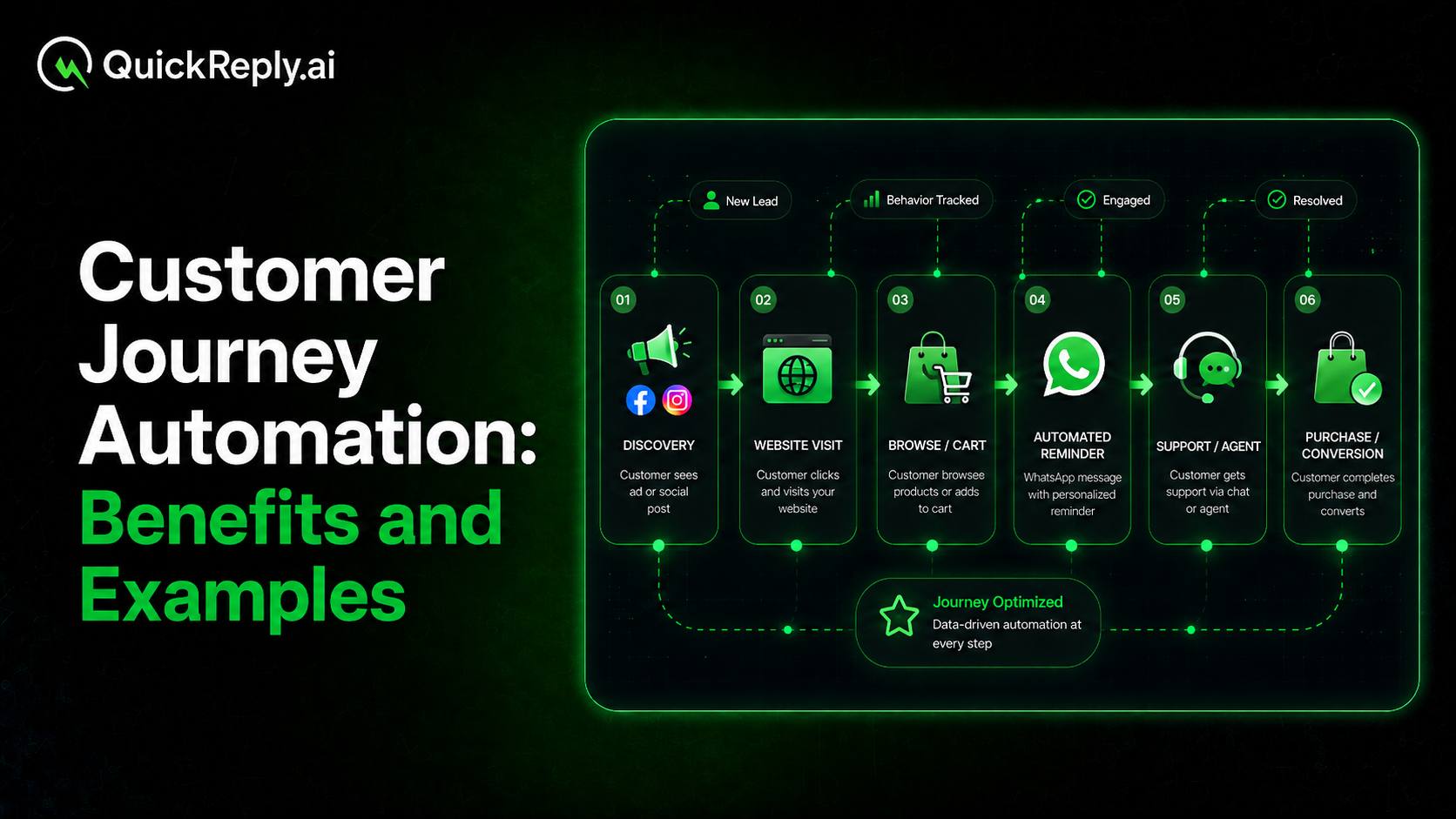
A shopper discovers a product through an Instagram ad but does not purchase immediately. Later, they visit the website, compare a few options and leave an item in the cart. The next day, they receive a reminder on WhatsApp, ask a delivery-related question and complete the purchase after speaking with a support agent.

For the customer, Instagram, the website, WhatsApp and customer support are not separate interactions. They are all part of the same buying journey.

The challenge for the business is ensuring that every channel recognises what has already happened and moves the customer forward without repeating messages or losing context.

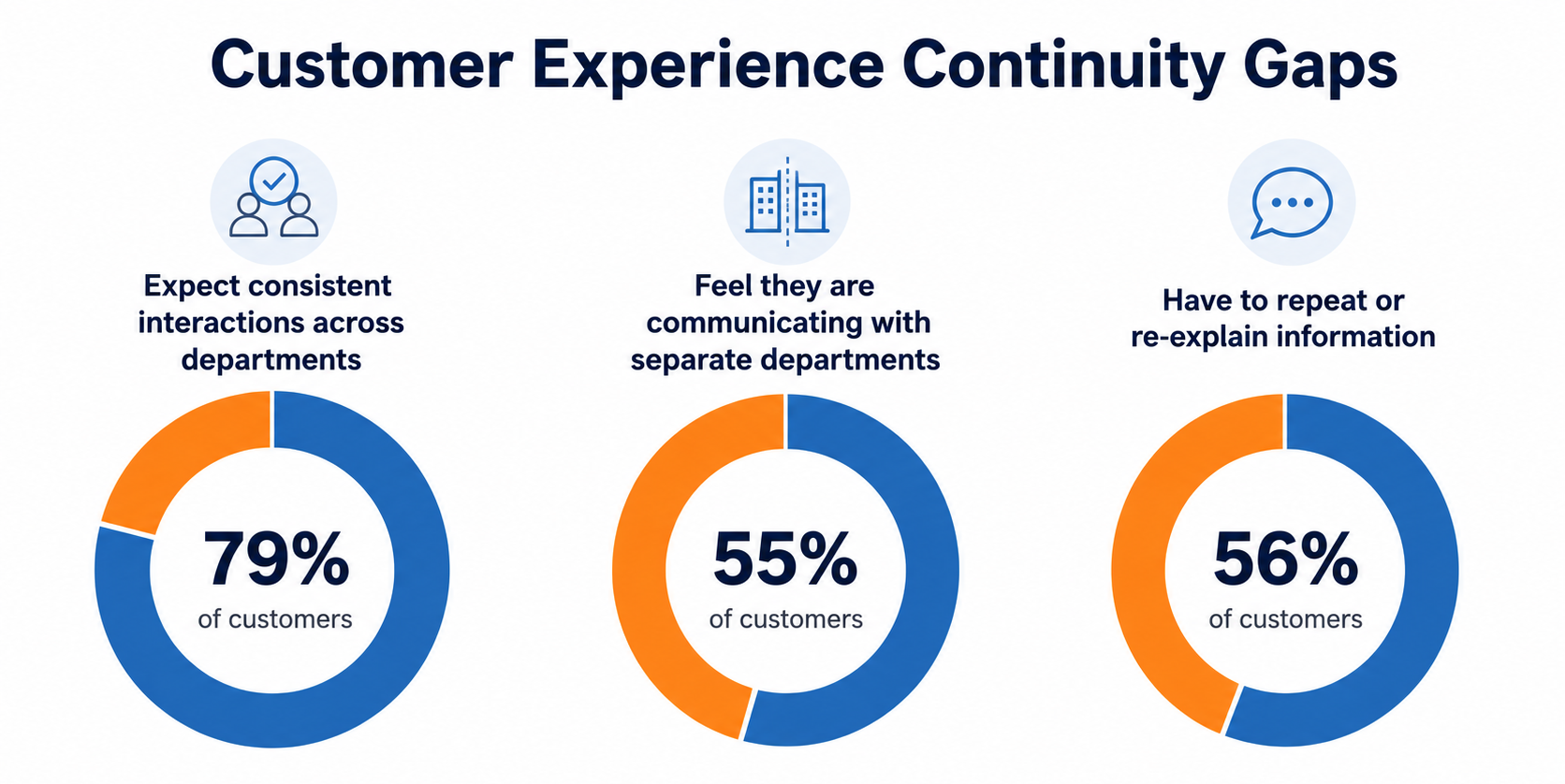
This continuity is still missing from many customer experiences. Salesforce research found that while 79% of customers expect consistent interactions across departments, 55% feel as though they are communicating with separate departments rather than one company. Another 56% say they often need to repeat information when speaking with different representatives.

McKinsey Report on
McKinsey Report: The Value of Getting Personalization Right or Wrong

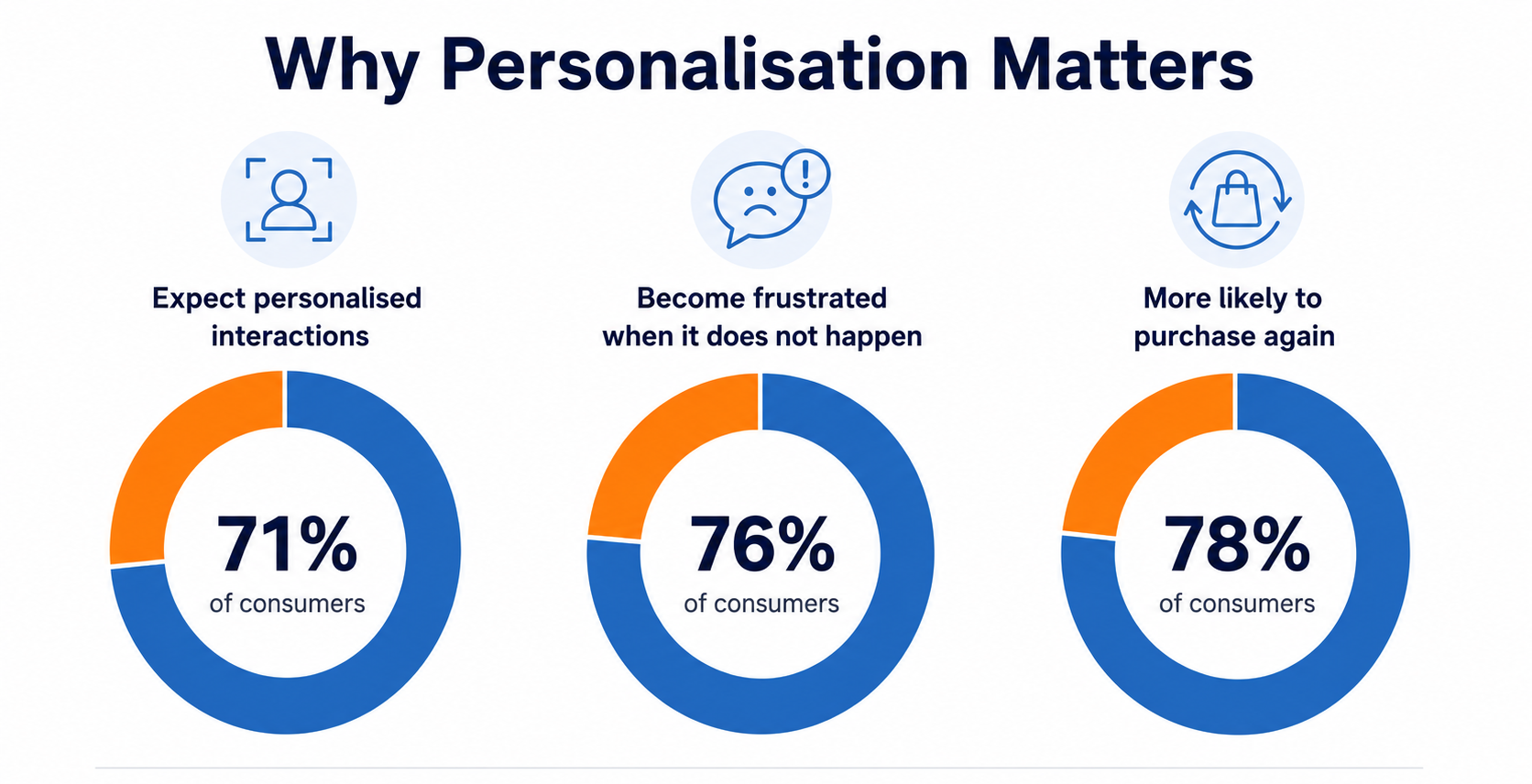
Relevance is equally important. According to McKinsey, 71% of consumers expect businesses to deliver personalised interactions, while 76% become frustrated when this does not happen. The same research found that personalised communication makes 78% of consumers more likely to purchase again.

Meeting these expectations manually becomes increasingly difficult as a business grows. Teams must track customer activity across multiple systems, decide what should happen next and coordinate communication across channels.

This is where customer journey automation helps. It allows businesses to create an automated customer journey that responds to customer behaviour, journey stage and previous interactions rather than treating every touchpoint as an isolated campaign.

This guide explains what automated customer journeys are, how they work across channels, their business benefits and how to implement them effectively.

TL;DR

  • An automated customer journey is a sequence of interactions triggered and adjusted by customer behaviour, data or lifecycle events.
  • Unlike a one-time campaign, the journey changes depending on whether the customer responds, converts, remains inactive or needs assistance.
  • Cross-channel journeys connect customer activity across platforms such as websites, WhatsApp, email, SMS, RCS, social messaging and human support.
  • Customer Journey Automation can improve customer experiences, marketing outcomes, operational efficiency and journey measurement.
  • Businesses should begin with one measurable use case, connect the required data, define journey logic and continuously optimise performance.
  • The right automation platform should support behavioural triggers, segmentation, channel coordination, two-way communication, fallback and agent handover.

What Is an Automated Customer Journey?

An automated customer journey is a sequence of customer interactions triggered and adjusted by behaviour, customer data or lifecycle events.

A person may enter a journey after submitting a form, viewing a product, abandoning a checkout, making a purchase, booking an appointment or becoming inactive for a defined period.

Once the customer enters, predefined rules decide what should happen next. The journey may consider:

  • The action the customer completed
  • Their customer segment or lifecycle stage
  • Whether they opened or answered a message
  • Whether they completed the intended action
  • How much time has passed since the previous interaction

A simple journey can be represented as:

Customer action → trigger → condition → message → response → next step or exit

For example, a cart-abandonment event may initiate a reminder. If the customer purchases before the message is sent, the journey ends. If they ask a question, the interaction may move to an agent instead.

This ability to respond to customer actions is what distinguishes Customer Journey Automation from simply scheduling messages.

Automated Journey vs One-Time Campaign

A one-time campaign sends a predefined message to a selected audience at a particular time.

The audience may be segmented, but the communication usually remains fixed. For example, a business might send the same promotional WhatsApp message to every customer who purchased within the previous six months.

An automated journey continues over time and adapts to customer behaviour.

One customer may complete the desired action after the first message. Another may require a follow-up. A third may respond with a question and move into a human conversation.

The distinction is straightforward:

  • One-time campaign: Sends a fixed communication to an audience
  • Automated journey: Changes according to customer actions and responses

A campaign is primarily built around a message. An automated journey is built around the customer’s progress towards an outcome.

Customer Journey Mapping vs Journey Automation

Customer journey mapping and journey automation are related, but they serve different purposes.

Customer journey mapping identifies the stages, actions and touchpoints a customer experiences while interacting with a business.

An ecommerce journey map, for example, may include:

Product discovery → comparison → checkout → payment → delivery → post-purchase support

The map helps the business understand where customers face friction and which teams or channels are involved.

Journey automation converts relevant stages from that map into trigger-based workflows.

A business may automate product recommendations after repeated browsing, reminders after checkout abandonment, order updates after purchase and feedback requests after delivery.

In simple terms, journey mapping shows what customers experience. Journey automation determines how the business responds.

Single-Channel, Multichannel and Cross-Channel Journeys

These terms describe different levels of channel coordination.

Single-channel journey

The complete journey operates through one channel. For example, a customer may receive an onboarding sequence entirely through email.

Multichannel journey

The business communicates through multiple channels, but each one may operate independently. A customer may receive email, SMS and WhatsApp messages without one system recognising what happened on another.

Cross-channel journey

Customer activity on one channel influences what happens across others.

For example, a website purchase can immediately stop WhatsApp and email recovery messages. A WhatsApp reply can pause an email follow-up and move the conversation to an agent.

A cross-channel journey therefore connects customer actions, rather than simply placing the business on multiple platforms.

How Automated Customer Journeys Work Across Channels

Once a customer enters an automated journey, shared data and predefined rules determine the next appropriate interaction.

The objective is not to send messages through every available platform. It is to use the right channel at the right stage while keeping the customer’s latest activity visible across the journey.

A cross-channel journey generally follows this process:

Shared customer data → journey logic → channel selection → customer response → next action, handover or exit

Customer Data Creates Shared Context

Cross-channel automation requires different systems to work with the same customer context.

Relevant information may come from:

  • Website or application activity
  • Ecommerce platforms
  • CRM systems
  • Previous purchases
  • Forms and lead records
  • Messaging interactions
  • Support conversations
  • Appointment or subscription systems

Suppose a customer completes a purchase through the website. That action should update the journey immediately so recovery messages are no longer sent through email, WhatsApp or SMS.

Similarly, when a customer asks a question on WhatsApp, the agent should be able to see the product viewed, the cart created and earlier interactions.

Shared context allows each channel to continue the journey rather than restart it.

Journey Logic Selects the Next Interaction

Journey logic uses customer behaviour and predefined conditions to choose the next step.

It may consider the customer’s lifecycle stage, previous actions, message engagement, product interest and time since the last interaction.

Two customers entering the same lead-nurturing journey may therefore follow different paths. One may reply immediately and move to a sales conversation. The other may remain inactive and receive additional information later.

The automation responds to how each customer progresses instead of forcing everyone through the same sequence.

Each Channel Plays a Specific Role

Effective cross-channel automation assigns a clear purpose to every channel.

For example:

  • WhatsApp supports timely and interactive communication.
  • Email works well for detailed or educational content.
  • SMS is suitable for brief and urgent notifications.
  • RCS can deliver rich mobile messages or provide fallback.
  • Instagram and Messenger can continue conversations that begin on social platforms.
  • Website chat assists customers while they are actively browsing.
  • Human agents handle complex, sensitive or high-intent interactions.

The selected channel may depend on urgency, message type, customer preference and previous engagement.

This prevents businesses from repeating the same message everywhere and allows each channel to contribute meaningfully.

Fallback Keeps the Journey Moving

The first selected channel may not always work. A message may remain undelivered, receive no response or become unsuitable for the next stage.

Fallback logic allows the journey to use another appropriate channel under defined conditions.

For example:

  • An undelivered WhatsApp message may be followed by RCS or SMS.
  • An unanswered email may lead to a WhatsApp reminder.
  • An inactive lead may be assigned to a sales representative.
  • An unresolved automated query may move to a support agent.

Fallback should not mean sending the same message across every channel at once. The system should choose the next appropriate action and stop further communication when the customer converts or responds.

Customer Responses Determine Whether the Journey Continues, Escalates or Ends

Every meaningful customer action should update the journey, regardless of where it happens.

A reply, purchase, booking, form submission, support request or opt-out can change the next step.

For instance, a WhatsApp response should cancel an upcoming email that asks the same question. A website purchase should stop active recovery communication across all channels.

Some actions may require human involvement. A customer can be transferred to an agent when they ask a complex question, show strong purchase intent, raise a complaint or request personal assistance.

The agent should receive relevant context so the customer does not need to repeat information.

The journey should also have clear exit conditions. A customer may leave after completing a purchase, booking an appointment, resolving a support request, entering another journey or opting out.

These rules ensure communication stops when it is no longer relevant.

Benefits of Automated Customer Journeys

The value of an automated customer journey goes beyond sending messages automatically.

By coordinating customer data, communication channels and internal teams, Customer Journey Automation can improve customer experiences, marketing performance, operational efficiency and decision-making.

1. Better Customer Experiences

Automated journeys help businesses deliver timely, relevant and consistent interactions based on the customer’s current needs.

a. Enhanced customer satisfaction

Customers are more likely to have a positive experience when they receive prompt assistance and useful information at important moments.

Automation can reduce delays during onboarding, appointment booking, order fulfilment and customer support. It can also guide customers towards the next action without requiring them to wait for a manual follow-up.

b. More Personalised Interactions

Journey automation can personalise communication according to browsing behaviour, purchase history, customer segment and previous responses, rather than simply adding a name to a message.

A first-time buyer may receive onboarding information, while an existing customer may receive a replenishment reminder or recommendation related to an earlier purchase.

c. More Consistent Experiences Across Channels

Customers receive connected communication even when they move between a website, messaging channel and human support.

This reduces repeated questions, conflicting information and disconnected conversations. The customer experiences one relationship with the business rather than several unrelated interactions.

2. Stronger Marketing and Revenue Outcomes

Customer Journey Automation helps marketing teams respond when behavior indicates interest, intent or a change in lifecycle stage.

a. More Efficient Marketing

Automated journeys reduce the need to manually create separate campaigns for every customer segment and moment.

Communication can be initiated when customers view a product, submit a form, abandon a checkout, become inactive or approach a renewal date.

This improves timing and allows marketing teams to spend more time on strategy, creative testing and optimization.

b. Better Conversion Opportunities

Automated journeys can support:

  • Lead qualification and nurturing
  • Cart and checkout recovery
  • Appointment and demo bookings
  • Product recommendations
  • Cross-sell and upsell
  • Renewals and repeat purchases

Customers showing strong intent can be connected to sales, while those requiring more information can continue receiving relevant content.

This helps the business act before the opportunity is lost.

c. Greater Loyalty and Retention

Engagement should not end after the first purchase.

Automated journeys can support post-purchase onboarding, replenishment, renewals, feedback, loyalty communication and inactive-customer re-engagement.

By maintaining useful communication and responding to declining engagement, businesses can strengthen customer trust and intervene before customers become inactive.

3. Higher Operational Efficiency

Automated journeys reduce the manual effort required to manage predictable customer interactions.

a. Higher Efficiency

Journey logic can be configured once and activated whenever a customer meets the relevant conditions. This can lead to:

  • Faster lead handling
  • Fewer missed follow-ups
  • Reduced manual campaign management
  • More consistent execution
  • Better coordination between marketing, sales and support
  • Personalization across larger customer segments

Automation can manage early-stage lead nurturing while representatives focus on customers who have responded or demonstrated stronger intent.

b. Lower Operational Costs

When teams spend less time managing routine interactions, businesses can support larger customer volumes without increasing operational effort at the same rate.

Employees can focus on complex conversations, strategic work and situations requiring judgement or personal attention.

The objective is not to remove people from the journey. It is to use them where they create the greatest value.

4. Better Customer Insights and Optimization

Automated journeys also help businesses understand how customers progress and convert across touchpoints.

a. More Reliable Journey Maurement

Businesses can identify:

  • Which channels generate engagement
  • Where customers stop progressing
  • Which interactions contribute to conversion
  • How long customers take to act
  • When agent involvement becomes necessary
  • How different segments behave

This gives teams a more complete view than measuring each message separately.

A customer may first engage through email, return to the website and convert after a WhatsApp conversation. Measuring only the final channel would overlook the contribution of earlier interactions.

b. Continuous Journey Optimisation

Journey data can improve audience segmentation, timing, channel selection, wait periods, branches and handover rules.

When customers repeatedly stop at the same stage, the business can investigate whether the message, timing, channel or required action is creating friction.

Over time, customer behaviour improves the journey, while journey performance helps the business make future interactions more effective.

Examples of Automated Customer Journeys

Businesses can automate journeys across acquisition, conversion, service and retention.

1. Acquisition and Lead Conversion

  • Lead qualification: A prospect enters after submitting a form, responding to an advertisement or starting a conversation. The journey collects relevant information and routes qualified leads to the appropriate representative.
  • Lead nurturing: Prospects who are not ready to purchase immediately can receive educational content, case studies, comparisons or invitations based on their interests and engagement.
  • Appointment or demo booking: The journey can help customers select a time, confirm the booking and receive reminders. It can also follow up when someone begins but does not complete the booking process.

2. Purchase and Conversion

  • Browse abandonment: Customers repeatedly viewing a product or service may receive additional information, recommendations or an invitation to ask questions.
  • Cart and checkout recovery: A customer leaving items in a cart can receive a reminder or support. The journey ends as soon as the purchase is completed.
  • Product recommendations: Recommendations may be based on browsing history, previous purchases or products commonly bought together.

3. Onboarding and Customer Service

  • Customer onboarding: After registration or purchase, the journey can guide customers through setup, account activation or important next steps.
  • Order and delivery communication: Customers can receive confirmations, shipment updates and delivery notifications. Exceptions such as delays or failed deliveries can be routed to support.
  • Appointment reminders: Customers can receive confirmations and reminders, with options to confirm, cancel or reschedule.
  • Support escalation: Routine questions can be handled automatically, while unresolved or complex cases move to an agent with the existing context.

4. Retention and Re-Engagement

  • Replenishment and renewal: Customers can receive reminders based on expected product usage, purchase frequency or subscription expiry.
  • Feedback collection: After a delivery, appointment or support interaction, the journey can request feedback. Low ratings may initiate service recovery, while positive responses may lead to a review request.
  • Inactive-customer re-engagement: Customers whose activity has declined can receive useful content, updates, recommendations or an appropriate incentive.
  • Loyalty and VIP engagement: Frequent or high-value customers can receive early access, exclusive updates, rewards or more personalized service.

How to Implement an Automated Customer Journey

Successful Customer Journey Automation begins with a clearly defined business problem, not with building the most complicated workflow possible.

1. Select a Measurable Objective

Start with one outcome, such as:

  • Increasing completed purchases
  • Improving lead response rates
  • Reducing appointment no-shows
  • Improving onboarding
  • Increasing repeat purchases
  • Reducing support response time

The objective should be specific. “Increase the percentage of qualified leads who book a demo” is more measurable than “improve engagement.”

2. Map the Existing Journey

Document what currently happens before automating it.

Identify:

  • How customers enter
  • What actions they take
  • Which channels they use
  • Where they stop progressing
  • Which teams are involved
  • Where delays or repeated work occur

This reveals which stages should be automated and where human involvement remains necessary.

3. Identify Data, Signals and Audience Conditions

Determine which information will operate the journey.

It may come from website activity, ecommerce events, CRM records, purchases, message responses, support systems or appointment platforms.

The business should also define exactly who qualifies to enter. Conditions may include lifecycle stage, product interest, previous purchase, engagement level, location or consent status.

Accurate data is essential. Automation built on incomplete records can scale irrelevant communication.

4. Assign a Role to Each Channel

Choose channels based on urgency, message depth, interactivity and customer preference.

Avoid activating every channel simply because it is available. Each one should have a clear purpose in helping the customer progress.

5. Design the Journey Logic

Define:

  • Entry trigger
  • Initial action
  • Wait periods
  • Conditions and branches
  • Fallback rules
  • Handover conditions
  • Conversion events
  • Exit rules

The journey should account for customers who respond, remain inactive or complete the desired action.

6. Create Channel-Specific Messages

Every message should reflect what the customer has already done, what information they need and what action should follow.

Do not copy the same message across email, WhatsApp, SMS and social channels. Adapt the length, format and call to action to how customers use each platform.

7. Test and Launch

Before launch, test:

  • Journey entry
  • Timing and delays
  • Conditional branches
  • Fallback
  • Agent handover
  • Conversion exits
  • Opt-out handling
  • Duplicate-message prevention

Begin with one high-impact use case rather than launching several journeys at once.

Lead qualification, cart recovery, onboarding and appointment reminders are common starting points.

8. Measure and Optimise

Review whether the right customers are entering, progressing and completing the intended outcome.

Optimisation may involve changes to timing, audience rules, messages, channel sequence, branches or handover conditions.

Customer Journey Automation should be treated as a continuously improving system rather than a workflow configured once and forgotten.

Metrics for Measuring Automated Customer Journeys

The right metrics depend on the journey objective. They should measure the complete experience rather than one message in isolation.

1. Reach and Delivery

  • Journey entry volume
  • Delivery rate by channel
  • Failed or undelivered messages
  • Fallback usage

These metrics show whether customers are entering the workflow and receiving communication successfully.

2. Engagement and Response

  • Opens
  • Clicks
  • Replies
  • Button selections
  • Form completions
  • Website visits

Response rate is particularly useful in conversational journeys where customers are expected to answer or select an option.

3. Progression and Drop-Off

Journey progression measures how many customers move from one stage to the next.

Drop-off shows where customers stop responding or leave without completing the intended action.

A high drop-off rate may indicate poor timing, unclear communication or excessive friction.

4. Conversion and Business Outcomes

Depending on the journey, conversion may include:

  • Completed purchases
  • Qualified leads
  • Booked appointments
  • Renewed subscriptions
  • Completed onboarding
  • Resolved support cases

Revenue-focused journeys should also measure attributed revenue while accounting for the contribution of multiple touchpoints.

5. Experience and Retention

  • Agent-handover rate
  • Opt-out rate
  • Journey completion rate
  • Retention rate
  • Repeat-purchase rate

These metrics help assess whether automation supports customers appropriately without creating excessive or irrelevant communication.

Common Customer Journey Automation Mistakes

  1. Automating a Broken Process: Automation does not fix unnecessary steps, unclear responsibilities or poor customer experiences. Simplify the process before converting it into a workflow.
  2. Treating Every Channel the Same: Customers use email, WhatsApp, SMS and social messaging differently. The message and role of each channel should reflect those differences.
  3. Sending Duplicate Messages: Disconnected systems may continue communicating after the customer has responded or converted elsewhere. Shared data and exit rules are necessary to prevent this.
  4. Using Incomplete or Outdated Data: Duplicate profiles, outdated attributes and missing consent information can result in failed or irrelevant communication.
  5. Over-Messaging Customers: More automation should not automatically mean more messages. Consider frequency, channel overlap and whether each interaction is genuinely useful.
  6. Ignoring Human Intervention: Some situations require empathy, judgement or negotiation. Define when automation should stop and how the customer should reach an agent.
  7. Measuring Messages Instead of Journeys: A strong click rate on one message does not necessarily indicate an effective journey. Measure progression, conversion, drop-off and combined channel contribution.
  8. Launching Too Many Journeys at Once: Starting with one high-impact use case makes testing, measurement and optimisation easier.

How to Choose a Customer Journey Automation Platform

The right platform should support connected journeys rather than only automating isolated message sends.

Look for the following capabilities:

  1. Visual Journey Builder: The platform should make it easy to configure triggers, conditions, branches, delays and exit rules.
  2. Real-Time Behavioural Triggers: It should respond to actions such as form submissions, purchases, cart abandonment, message replies and changes in activity.
  3. Customer Segmentation: Businesses should be able to create audiences using customer attributes, behaviour, purchase history, engagement and lifecycle stage.
  4. Cross-Channel Orchestration: The platform should coordinate communication across channels and update the journey when the customer acts on any one of them.
  5. Integrations: Important integrations may include:
    • Ecommerce platforms
    • CRM systems
    • Websites and applications
    • Payment systems
    • Support tools
    • Analytics platforms
    • Appointment and subscription software
  6. Two-Way Communication: For conversational channels, the platform should support replies, interactive options and response-based branches.
  7. Fallback and Agent Handover: The journey should be able to move to another channel when required and transfer conversations to human support without losing context.
  8. Journey Analytics: Businesses should be able to measure entry, delivery, engagement, progression, conversion, revenue, drop-off and agent involvement.
  9. Consent and Opt-Out Management: The platform should respect channel permissions, preferences and opt-out requests throughout the journey.
  10. Scalability: It should support growing customer volumes, additional channels and more complex workflows over time.

QuickReply.ai helps businesses build automated customer journeys across channels such as WhatsApp, RCS, SMS, Instagram, Messenger and website chat.

It combines customer data, behavioural triggers, two-way communication, channel fallback and agent handover within connected workflows. Its Shopify integration can also use store and customer activity to initiate journeys such as lead nurturing, cart recovery, order communication and post-purchase engagement.

Build Connected Customer Journeys with QuickReply.ai

Customers expect every interaction with a business to feel connected, regardless of the channel they use. QuickReply.ai helps brands automate customer journeys across WhatsApp, RCS, SMS, Instagram, Messenger and website chat while bringing conversations and agent interactions into one unified inbox. 

With behavioural workflows, chatbots, intelligent routing, shared customer context and seamless human handover, businesses can create journeys that respond to customer actions across acquisition, conversion, support and retention. 

Instead of managing isolated campaigns and disconnected conversations, teams can use QuickReply.ai to deliver more relevant, coordinated and scalable customer experiences across messaging channels.

Turn 1 time visitor into repeat customer with WhatsApp marketing

Leverage the untapped growth potential of WhatsApp marketing to acquire and retain customers.

Frequently Asked Questions

What is Customer Journey Automation?

Customer Journey Automation uses customer data, behaviour and predefined rules to coordinate interactions across lifecycle stages and communication channels. The journey changes according to what the customer does rather than sending everyone the same fixed sequence.

What is an example of an automated customer journey?

A lead submits a form, receives relevant information and is asked a qualifying question. Their response determines whether they continue receiving nurturing content or move directly to a sales representative.

How is an automated journey different from a campaign?

A campaign sends a predefined communication to a selected audience. An automated journey continues over time and changes according to customer behaviour, responses and lifecycle events.

What is the difference between multichannel and cross-channel automation?

Multichannel automation uses several channels that may operate independently. Cross-channel automation connects them so that activity on one channel influences communication on others.

Which customer journey should a business automate first?

Begin with a journey that has a clear customer action, measurable outcome, sufficient data and repetitive manual work. Lead qualification, cart recovery, appointment reminders and onboarding are common starting points.

What data is required for Customer Journey Automation?

Required data may include contact details, profile information, website behaviour, purchase history, message interactions, lead status, appointments, subscriptions and support activity.

Only relevant data should be used, and customer consent requirements must be respected.

Can an automated customer journey include human agents?

Yes. Automation should transfer customers to human agents when they request assistance, show strong intent or raise a query that cannot be handled automatically.

How do you measure an automated customer journey?

To measure automated customer journey include metrics like delivery, engagement, response, progression, drop-off, conversion, revenue, completion, agent handover, opt-out and retention.