


%201.svg)


Copied to clipboard!
Do I need RCS enabled to receive RCS broadcast messages?
Yes. To receive RCS broadcast messages, your phone should support RCS, your carrier should support it, and RCS should be enabled on your device.
RCS is becoming an important messaging format for receiving richer business and broadcast messages on smartphones. Unlike normal SMS, RCS can support richer experiences such as images, buttons, carousels, read receipts, typing indicators, and branded business messages.
If you want to receive RCS broadcast messages on your phone, you need to make sure RCS is supported and enabled on your device. This guide explains how to enable RCS on both Android and iPhone, how to check whether it is working, and what to do if you are still not receiving RCS messages.
Yes, RCS can be used by businesses to send rich broadcast-style messages. These are often sent through RCS Business Messaging, also known as RBM.
For example, a business may use RCS to send:
As a user, you usually do not need to register separately for RCS broadcast messages. You only need to make sure that RCS is available and turned on for your phone. However, whether you receive a message as RCS also depends on your telecom operator, phone settings, internet connection, and the sender’s messaging setup.
Before turning on RCS, check the following:
This is important because RCS does not work only from one setting. It depends on your device, operating system, messaging app, network provider, and internet connection.
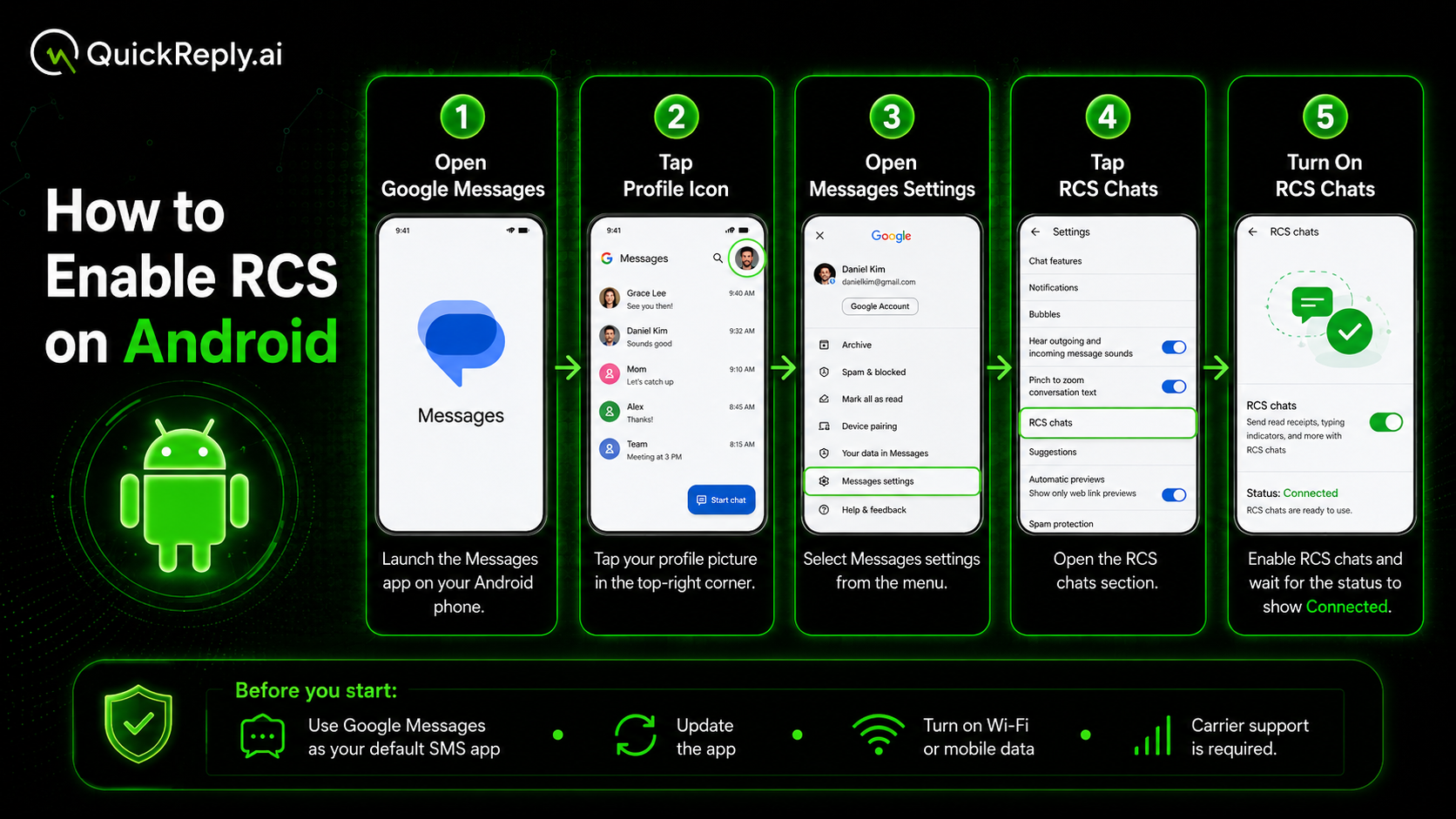
On most Android phones, RCS works through the Google Messages app. Google’s official RCS instructions also follow the same path: open Google Messages > click on profile picture > go to Messages settings > select RCS chats > turn RCS chats on or off.
Follow these steps:
If your phone asks you to verify your number, complete the verification process. In some cases, it may take a few minutes for RCS to activate.
If you do not see the RCS option, update the Google Messages app from the Play Store and make sure it is set as your default messaging app.
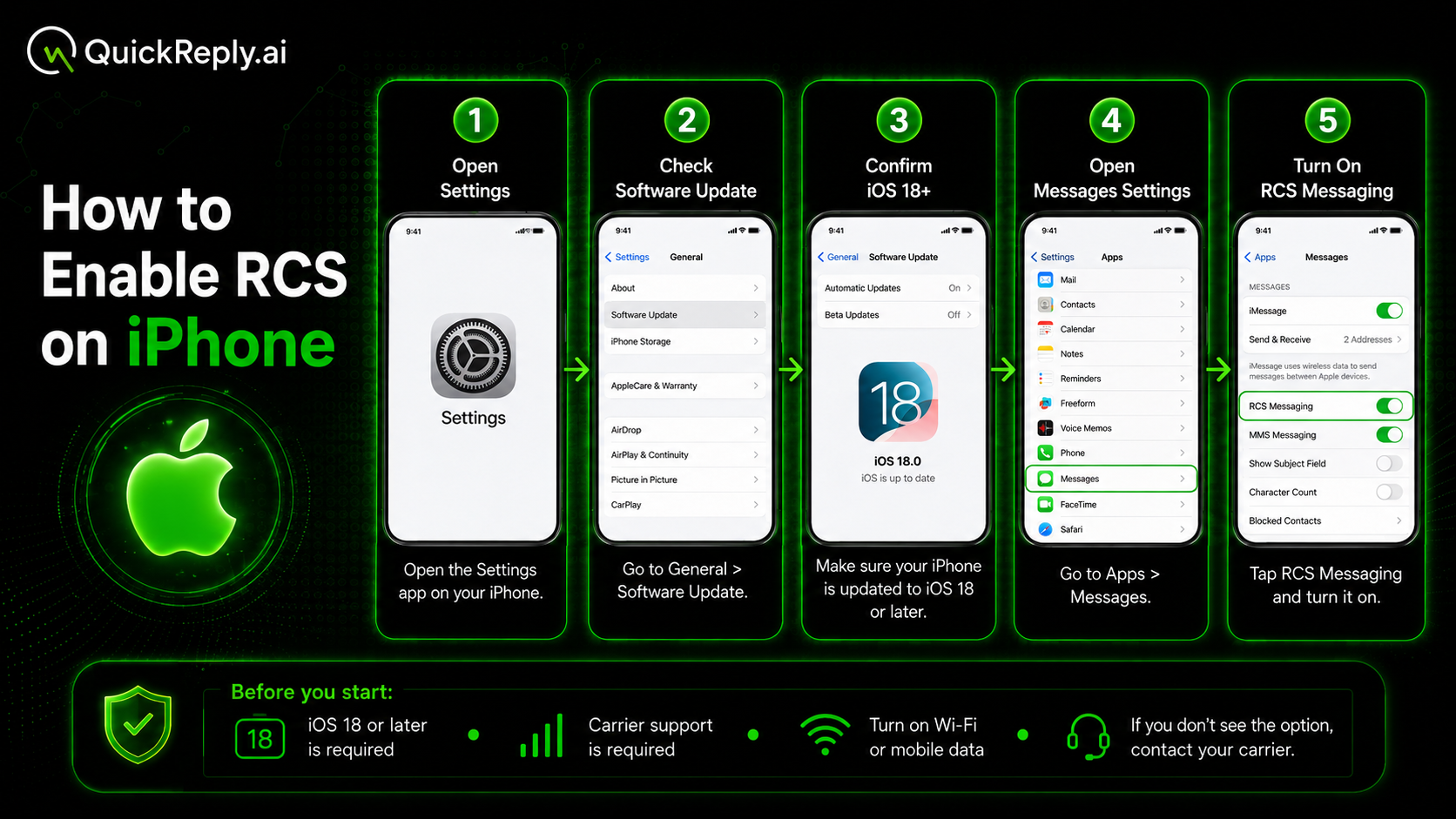
RCS is also available on iPhone, but it requires iOS 18 or later and a mobile carrier that supports RCS on iPhone. Apple’s official support page mentions that users need iOS 18 and a mobile data plan from a network provider that supports RCS messaging on iPhone.
Follow these steps:
Apple’s support instructions also mention the same path: Settings app > Apps > Messages > RCS Messaging > turn RCS Messaging on or off.
If you do not see the RCS Messaging option, your carrier may not support RCS on iPhone yet. In that case, you may need to contact your telecom operator for confirmation.
After enabling RCS, you can check whether it is working through the messaging experience.
On Android, open Google Messages and go to Messages settings > RCS chats. If RCS is active, the status should show as connected.
You may also notice features such as:
On iPhone, RCS works when your iPhone, carrier, and the other person or business sender support RCS. If RCS is unavailable, messages may still arrive as SMS or MMS. Apple also notes that carrier fees may apply, and users should contact their wireless network provider for more information.
If RCS is turned on but you are still not receiving RCS broadcast messages, the issue may be with your phone settings, network support, messaging app, or the sender’s campaign setup.
Try these steps:
Try these steps:
Google also provides a troubleshooting option for RCS issues, including resetting RCS chat if messages are not coming through or RCS will not sync.
RCS business messages can be useful, but you should still be careful when receiving messages from any business or an unknown sender.
Follow these safety tips:
RCS can make business messaging richer and more interactive, but users should still follow basic digital safety practices.
Enabling RCS on your smartphone is simple, but receiving RCS broadcast messages depends on more than one setting. Your phone, operating system, messaging app, telecom operator, internet connection, and the business sender’s RCS setup all play a role.
If you use Android, you can usually enable RCS through the Google Messages app. If you use an iPhone, you need iOS 18 or later and a carrier that supports RCS on iPhone.
Once RCS is enabled, you can receive richer business and broadcast messages with images, buttons, interactive elements, and better messaging features compared to regular SMS.

Tool and strategies modern teams need to help their companies grow.
Leverage the untapped growth potential of WhatsApp marketing to acquire and retain customers.
Yes. To receive RCS broadcast messages, your phone should support RCS, your carrier should support it, and RCS should be enabled on your device.
Yes. iPhone users can receive RCS messages if they are using iOS 18 or later and their mobile carrier supports RCS on iPhone.
Yes. Android users can receive RCS broadcast messages if RCS chats are enabled, the messaging app supports RCS, and the carrier supports RCS.
The RCS option may not appear if your phone, carrier, operating system, or messaging app does not support RCS. On Android, you may need to update Google Messages or set it as your default SMS app. On iPhone, your carrier must support RCS.
Yes. RCS usually works through mobile data or Wi-Fi. If internet is not available, some messages may fall back to SMS or MMS.
This can happen if RCS is not available for that sender, your carrier does not support it fully, your internet connection is off, or the business campaign was sent as SMS instead of RCS.
RCS generally uses mobile data or Wi-Fi. However, carrier charges may apply depending on your mobile plan and network provider.
RCS can be safe when messages come from verified businesses. However, you should still avoid suspicious links and never share OTPs, passwords, or sensitive payment information.
Yes. You can turn off RCS from the same settings menu where you enabled it. On Android, go to RCS chats in Google Messages. On iPhone, go to RCS Messaging under Messages settings.
If RCS is not available, the message may be sent or received as SMS or MMS instead. You may still receive the message, but rich features like buttons, images, and interactive elements may not work.