How can I integrate WhatsApp API with my ecommerce website?

Copied to clipboard!

For most ecommerce businesses today, customer conversations don’t just happen on email; they happen on WhatsApp. From order confirmations to delivery updates and even marketing campaigns, brands are increasingly relying on WhatsApp to stay connected with their customers in real-time. The average open rate of WhatsApp messages is more than 90%, which is why ecommerce brands are leveraging this platform to engage with their customers.

That’s where WhatsApp API integration comes in. It allows businesses to automate conversations, send personalized notifications at scale, and create a seamless post-purchase experience. If you’re running a Shopify store or any ecommerce website, there are two ways to integrate the WhatsApp API: 

  • Direct integration using WhatsApp Cloud API
  • Using a tech solution provider or platform 

While direct integration gives you more control, it requires technical resources, development effort, and ongoing maintenance. On the other hand, using a platform simplifies the process by handling API access, setup, and automation, making it easier for most businesses to get started quickly.

In this blog, we’ll walk you through exactly how to set up WhatsApp API integration for your website, especially for Shopify users. You’ll learn the step-by-step process, what tools you need, and how to start sending automated messages, from order updates to bulk campaigns, without any complex setup.

TL;DR

  1. WhatsApp API integration helps ecommerce brands automate order updates, abandoned cart reminders, customer support, broadcasts, and two-way conversations.
  2. There are two ways to integrate WhatsApp API with an ecommerce website: direct integration through WhatsApp Cloud API or using a platform like QuickReply.ai.
  3. Direct WhatsApp Cloud API integration gives more control but needs developers, webhook setup, backend integration, hosting, testing, and ongoing maintenance.
  4. For Shopify stores, QuickReply.ai offers a simpler no-code setup where businesses can install the app, connect their WhatsApp Business API number, sync Shopify data, and set up automation flows.
  5. After integration, brands can send order confirmations, delivery updates, promotional campaigns, cart recovery messages, support replies, and personalized customer journey messages.

WhatsApp Cloud API vs No-Code Platform: Which Option Should You Choose?

WhatsApp Cloud API vs No-Code Platform: Which Option Should You Choose?

Comparison Point WhatsApp Cloud API No-Code Platform
Best suited for Businesses with in-house developers or technical teams Ecommerce brands, Shopify stores, marketers, and teams that want faster setup
Setup process Requires Meta Developer setup, app creation, API configuration, webhooks, and backend development Install the app, connect WhatsApp Business API, complete onboarding, and start setting up flows
Technical effort High Low
Developer dependency Required for setup, testing, maintenance, and troubleshooting Minimal to none for standard Shopify and ecommerce workflows
Time to go live Can take longer depending on development complexity Faster, especially for Shopify stores
Automation setup Needs to be built manually through APIs and backend logic Ready-to-use automation flows can be configured from the dashboard
Ecommerce integration Custom integration needed with your store backend Shopify data syncs automatically through the app
Message templates You need to create, submit, and manage templates manually Platform support makes template setup and approval easier
Webhooks and events Developers need to configure webhooks for orders, carts, payments, and replies Platform handles event syncing and trigger-based automation
Campaign management Needs to be built separately Built-in campaign and broadcast tools are available
Customer support inbox Not included by default Shared inbox and agent handover features are usually available
Maintenance Requires ongoing technical maintenance Platform manages most backend and API complexity
Flexibility and control High control for custom use cases Easier to use, but custom control may depend on platform capabilities
Cost structure Meta messaging charges plus development and maintenance costs Platform fee plus Meta messaging charges
Ideal use case Custom products, SaaS platforms, or businesses needing full API control Ecommerce brands that want order updates, cart recovery, campaigns, and support automation without complex setup

In simple terms, choose WhatsApp Cloud API if you have a technical team and want full control over the integration. On the other hand, choose a no-code platform like QuickReply.ai if you want to integrate WhatsApp with your ecommerce website faster, automate customer journeys, recover carts, send order updates, and run campaigns without managing backend complexity.

Step-by-Step Process to Integrate WhatsApp API with Ecommerce Website

There are two ways to set up WhatsApp API integration for your ecommerce website. You can either go for direct integration using WhatsApp Cloud API or use a platform that simplifies the process. 

A. Direct Integration Using WhatsApp Cloud API (For Developers)

If you have access to technical resources, you can directly integrate WhatsApp using Meta’s Cloud API. Here’s how the process typically works: 

Step 1: Set Up Meta Business Account

  • Create or log in to your Meta Business Manager
  • Verify your business details

Step 2: Access WhatsApp Cloud API

  • Go to Meta for Developers
  • Create an app and add the WhatsApp product
  • Generate a temporary access token

Step 3: Add and Verify Phone Number

  • Add a phone number for WhatsApp Business
  • Verify it using OTP
  • Link it to your WhatsApp Business Account (WABA)

Step 4: Configure Webhooks

  • Set up a server to receive incoming messages and events
  • Configure webhook URLs for real-time communication

Step 5: Create and Submit Message Templates

  • Design message templates for notifications or campaigns
  • Submit them for WhatsApp approval

Step 6: Integrate with Your Ecommerce Backend

  • Connect your store events (orders, carts, payments) with the API
  • Trigger messages based on customer actions

Step 7: Test and Go Live

  • Test API calls and message delivery
  • Move from test environment to live setup

While this method gives you full control, it requires development effort, hosting, and ongoing maintenance.

B. Using a Platform (No-Code Method for Shopify Users) 

You can use a platform like QuickReply.ai that connects your ecommerce store with WhatsApp and handles the API setup for you. Here’s a simplified, step-by-step process:

Step 1: Install QuickReply.ai on Shopify

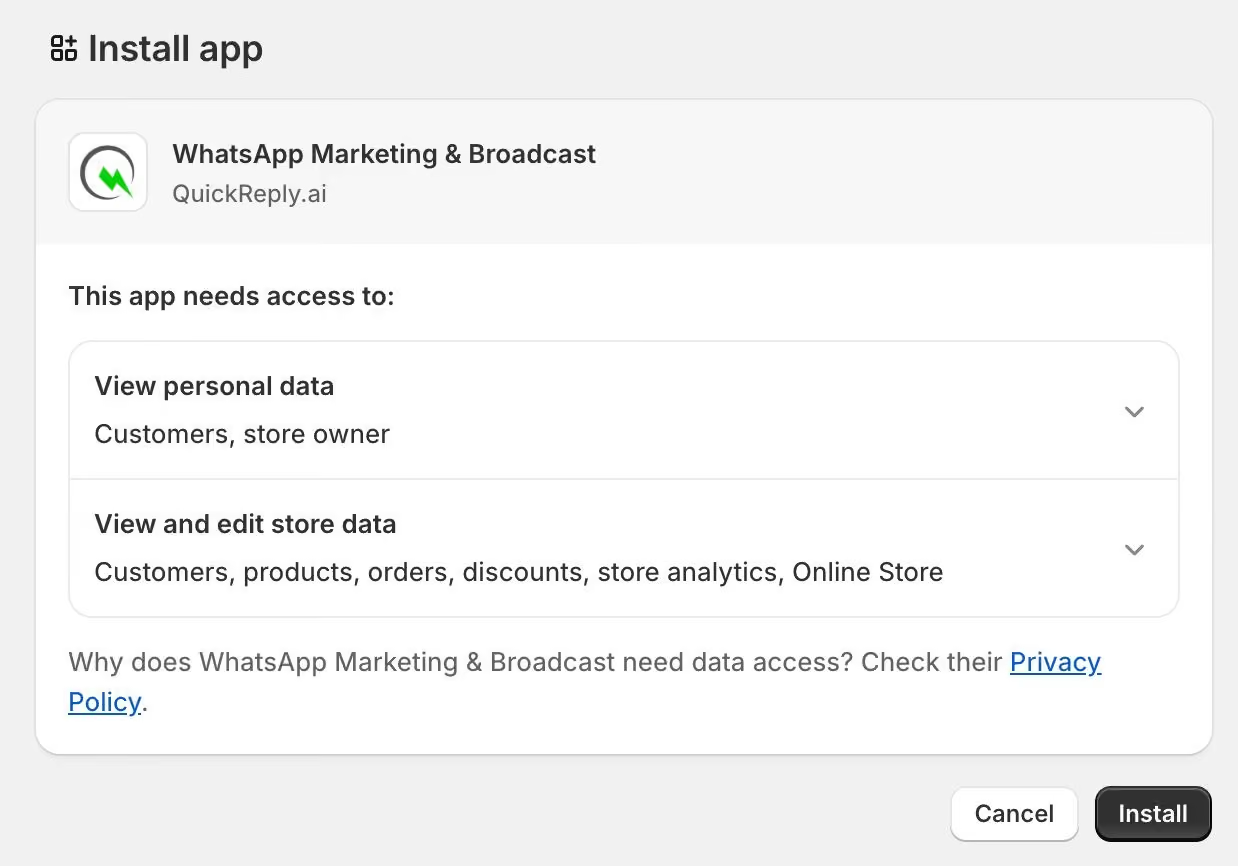
Install QuickReply.ai from Shopify app store

If you have a Shopify website, then start by installing the QuickReply.ai app from the Shopify App Store.

  • Log in to your Shopify admin
  • Go to the App Store and search for QuickReply.ai and click “Install.”

Step 2: Create and Activate Your Account

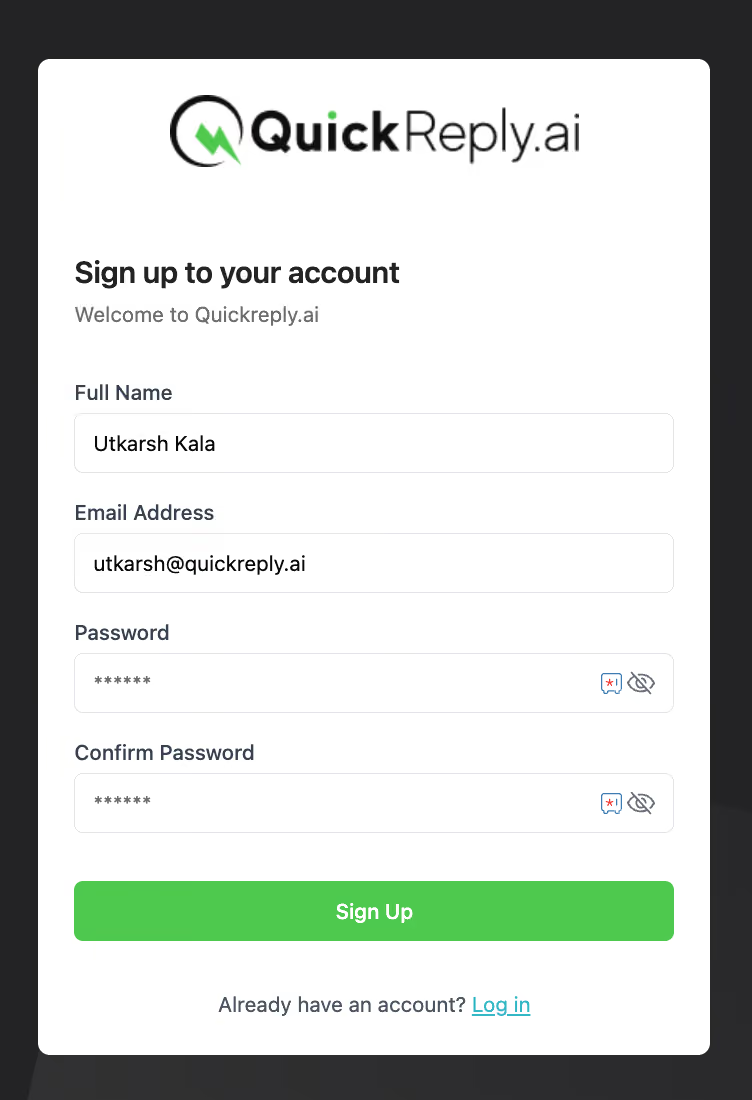
Sign-up to your QuickReply.ai Account

Once the app is installed:

  • Sign up using your email and create a secure password
  • Verify your email address
  • Add basic business details like company name, website, and location

Step 3: Connect Your WhatsApp Business API

Next, you’ll connect your WhatsApp number:

  • Log in with your Facebook account linked to Meta Business Manager
  • Select or create your WhatsApp Business Account (WABA)
  • Add and verify your phone number
  • Complete your business profile

Step 4: Complete Onboarding & Activation

To fully activate your account:

  • Book a demo or onboarding session
  • Confirm your plan
  • Get access to the dashboard and automation features

At this stage, your backend setup is complete and ready for integration workflows.

Step 5: Connect Shopify Data with WhatsApp

Once everything is set up:

  • Your Shopify store gets connected automatically through the app
  • Customer actions (orders, carts, sign-ups) start syncing

This is what allows you to trigger automated WhatsApp notifications based on real-time store activity.

Step 6: Set Up Automation Flows

Now you can configure what messages you want to send:

  • Order confirmation messages
  • Shipping and delivery updates
  • Abandoned cart reminders
  • Customer support replies

For example, when a customer places an order, you can automatically send a confirmation message with order details and delivery timeline.

Step 7: Test and Go Live

Before going live:

  • Test message flows
  • Check if triggers are working correctly
  • Ensure templates are approved by WhatsApp

This entire process might sound technical, but with the right platform, it’s mostly plug-and-play, no coding required.

What You Can Do with WhatsApp API After Integration 

Once your WhatsApp API integration is live, your ecommerce store becomes much more than just a selling platform; it turns into a real-time communication engine.

Here are the most impactful things you can start doing:

1. Send Automated Order Notifications

 Keep customers informed at every stage:

  • Order confirmation
  • Payment updates
  • Shipping and delivery alerts

These are transactional messages powered by WhatsApp API to send messages, ensuring timely and reliable communication.

2. Recover Abandoned Carts

A large percentage of users drop off before completing a purchase. With WhatsApp API, you can:

  • Send reminder messages
  • Offer incentives or discounts
  • Bring customers back to checkout

This is one of the highest ROI use cases for ecommerce brands.

3. Run Broadcast Messages at Scale

With proper opt-ins, you can use WhatsApp API to send bulk messages for:

  • Product launches
  • Festive offers
  • Flash sales
  • Personalized promotions

Compared to email, WhatsApp messages have significantly higher open and engagement rates.

4. Automate Customer Support

Reduce support load by:

  • Setting up quick replies
  • Automating FAQs
  • Routing conversations efficiently

This ensures faster response times and better customer satisfaction.

5. Enable Two-Way Conversations

Unlike traditional channels, WhatsApp allows real conversations:

  • Here, both customers can interact through live chat and WhatsApp Chatbots
  • You can assist, upsell, or resolve issues in real time

This enables you to create a more personalized and engaging shopping experience.

6. Build Automated Customer Journeys

WhatsApp API also helps you create connected customer journeys across the ecommerce funnel.

For example, when a customer visits your website, browses a product, adds it to the cart, but does not complete the purchase, you can automatically send a WhatsApp reminder. If they buy, you can send order updates, delivery alerts, product usage tips, review requests, and repeat purchase offers.

With the right setup, WhatsApp can help you:

  • Send browse abandonment reminders
  • Recover abandoned carts
  • Share personalized offer alerts
  • Recommend products based on past purchases
  • Send post-purchase follow-ups
  • Build loyalty through repeat engagement

This turns WhatsApp from a simple messaging channel into a complete customer journey automation channel for ecommerce brands.

Why Choose QuickReply.ai to Integrate WhatsApp API with Your Ecommerce Platform?

Integrating WhatsApp API directly through WhatsApp Cloud API can work well for businesses with strong technical teams. But for many ecommerce brands, the process can become time-consuming and resource-heavy. It requires Meta Developer setup, webhook configuration, backend development, template management, store-event mapping, testing, maintenance, and ongoing troubleshooting.

This also means additional costs. You may need developer bandwidth, server setup, API maintenance, and continuous support whenever order events, cart events, message triggers, or templates need changes. For fast-moving ecommerce teams, this can slow down execution.

A no-code platform like QuickReply.ai makes the process much simpler. It helps you connect WhatsApp API with your ecommerce store, sync customer and order data, set up automated journeys, recover abandoned carts, send order updates, manage conversations, and run campaigns without building everything from scratch.

Instead of spending time on technical setup, your team can focus on improving customer engagement, increasing repeat purchases, and driving more sales through WhatsApp.

Want to see how QuickReply.ai can simplify WhatsApp API integration for your ecommerce business? Book a Free Demo at your convenience.

Turn 1 time visitor into repeat customer with WhatsApp marketing

Leverage the untapped growth potential of WhatsApp marketing to acquire and retain customers.

Frequently Asked Questions

What is WhatsApp API integration for e‑commerce?

It is the process of connecting your online store and backend systems to the official WhatsApp Business API so you can send automated, personalized notifications and run 2‑way chats with customers at scale.

Do I need developers to integrate WhatsApp API with my website?

If you use platforms like Shopify with QuickReply.ai, most of the setup is no‑code (install app, connect number, configure flows). For custom stacks, your devs will integrate API calls and webhooks once, and then marketers can manage campaigns visually.

Can I use WhatsApp API to send bulk messages for promotions?

Yes, within WhatsApp’s policies and with proper opt‑in. You can run segmented broadcasts, festival campaigns, and restock alerts using pre‑approved marketing templates, instead of blasting generic bulk messages.

How is WhatsApp API different from the WhatsApp Business app?

The app is manual and phone‑limited; the API supports automation, multi‑agent access, integration with e‑commerce and CRM, and large‑scale campaigns with templates and analytics.

Is WhatsApp Business API free?

No. You pay per conversation window as defined by Meta, plus any platform fees charged by your provider.

Can I integrate WhatsApp with Shopify specifically?

Yes. With QuickReply.ai, you just install the Shopify app, connect your WhatsApp Business API number, and then configure pre‑built journeys like abandoned cart, order updates, COD to prepaid, and review requests.

Can I add a WhatsApp chat button on my website through the API?

Yes. Platforms like QuickReply.ai let you add a WhatsApp widget or button that launches a chat, collects first‑party data, and routes the conversation to bots or agents.

What kind of messages can I send via WhatsApp Business API?

You can send text, images, videos, documents, interactive buttons, lists, catalogs, as well as utility, marketing, and authentication templates like OTPs and order updates.

Can I track sales and ROI from WhatsApp?

Yes. QuickReply.ai provides detailed analytics on revenue generated from each campaign and flow, message engagement, and segment performance, so you can optimize and scale confidently.

What is the difference between WhatsApp Cloud API and WhatsApp Business API?

WhatsApp Cloud API is the official cloud-hosted version provided by Meta, allowing direct integration. WhatsApp Business API is the broader term that includes both Cloud API (direct access) and integrations offered through service providers. In practice, both enable similar messaging capabilities, but the setup and management differ.