Live Chat vs Chatbot: Differences, Use Cases & Human Handoff

Copied to clipboard!

Choosing between live chat and a chatbot is no longer really an either-or decision.

Live chat connects customers with human agents who can understand nuance, exercise judgment, and handle exceptions. Chatbots provide immediate, scalable assistance for questions and tasks that can be automated. For most businesses, the better model is to use AI for conversations it can confidently resolve and transfer the customer to a human when judgment, empathy, authorization, or deeper assistance is required.

That balance is becoming increasingly important as customer expectations change. Zendesk's 2026 CX Trends research found that 74% of consumers now expect customer service to be available 24/7 because of AI, while another 74% say they are frustrated when they have to repeatedly explain their situation to different agents.

The challenge, therefore, is not simply deciding between live chat and a chatbot. It is designing a support experience where automation and humans work together without making the customer start over when the conversation moves between them.

In this guide, we compare live chat vs chatbots, explain where each works best, and show how a timely bot-to-human handoff can combine the speed of AI with the judgment of a human agent.

Live Chat vs Chatbot: Key Differences at a Glance

Factor AI Chatbot Live Chat
Who responds? AI or automated workflow Human agent
Response time Usually immediate Depends on agent availability and queue
Availability Can operate 24/7 Usually dependent on working hours
Scalability Can handle many conversations simultaneously Limited by available agents
Routine queries Excellent Effective, but often inefficient
Complex queries Can handle many, but has limits Better for nuanced or unusual cases
Empathy Limited Strong
Judgment and exceptions Limited by rules, data, and permissions Strong
Cost at high volumes Generally lower per conversation Increases with staffing requirements
Personalization Strong when connected to customer and business data Strong when agents have complete context
Best suited for Repeatable and predictable interactions Complex, sensitive, or high-value conversations
Ideal role Resolve, collect information, qualify, and triage Take over conversations that require human involvement

The strongest customer-support setup usually does not make one replace the other.

Instead, chatbots handle conversations that are safe and efficient to automate, while human agents step in when the situation moves beyond automation.

What Is Live Chat?

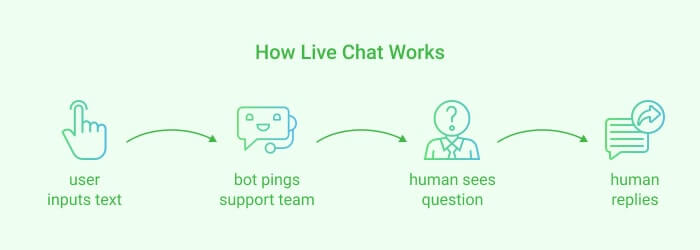
How Live Chat Works

Live chat is a real-time messaging channel that allows customers to communicate directly with a human representative through a website, app, or messaging platform.

Unlike email or support tickets, live chat is designed for immediate or near-immediate communication.

A customer might use live chat to:

  • Ask for help choosing between two products
  • Resolve a payment problem
  • Explain an unusual delivery issue
  • Request an exception to a return policy
  • Discuss a complicated technical problem
  • Speak with a sales representative before making a high-value purchase

The main strength of live chat is not simply that a human is responding. It is that a human can interpret context and make decisions that are difficult to define in advance.

Benefits of live chat

Live chat works especially well when conversations require:

  • Human judgment: Agents can assess unusual situations instead of relying solely on predetermined rules.
  • Empathy: Frustrated or concerned customers may need reassurance rather than another automated response.
  • Exception handling: A human can determine whether a situation justifies a refund, replacement, discount, or policy exception.
  • Complex problem solving: Agents can ask follow-up questions and adapt their approach as new information appears.
  • High-value conversations: Sales or support teams can spend more time on customers where human assistance can meaningfully affect the outcome.

Limitations of live chat

The biggest limitation is scalability.

One chatbot can interact with many customers at the same time. A human agent has a finite number of conversations they can manage effectively.

Live chat also depends on:

  • Agent availability
  • Working hours
  • Queue length
  • Training
  • Response time
  • Staffing levels

This means sending every simple question to a live agent can be both expensive and inefficient.

An agent who spends time answering “Where is my order?” for the hundredth time has less time available for the customer whose payment failed or whose shipment arrived damaged.

That is where automation becomes useful.

What Is a Chatbot?

A chatbot is software that interacts with customers conversationally and automatically performs predefined or AI-assisted tasks.

However, the term chatbot now covers several very different technologies.

Treating every chatbot as the same type of system can make a live chat vs chatbot comparison misleading.

Rule-Based Chatbot vs AI Chatbot vs AI Agent

Technology How it works Best suited for
Rule-based chatbot Follows predefined buttons, branches, keywords, or decision trees FAQs, forms, bookings, qualification, structured workflows
AI chatbot Understands natural-language questions and generates or retrieves relevant responses Product questions, support queries, discovery, conversational assistance
AI agent Combines language understanding with business data, tools, workflows, and actions Resolving queries, accessing systems, completing tasks, and orchestrating workflows
Human agent Understands context and can apply judgment, empathy, authority, and discretion Complex, sensitive, exceptional, or high-value situations

Traditional rule-based bots work particularly well where the conversation is predictable.

For example:

Track my order → Enter order number → Show shipment status.

Modern AI chatbots can handle much less structured questions, such as:

“I need comfortable running shoes for someone who runs about 5 km three times a week. What would you recommend?”

Rather than matching a fixed button or keyword, the AI can interpret what the customer is trying to accomplish and respond using the business's product or support knowledge.

AI agents can go further by connecting that conversation to business systems and actions.

This distinction matters because many traditional criticisms of chatbots, such as “chatbots only understand keywords,” apply primarily to older rule-based systems rather than modern conversational AI.

Live Chat vs Chatbot: 8 Key Differences

1. Response Speed

Best for response speed: Chatbot 

A chatbot can usually respond as soon as the customer sends a message.

A live-chat response depends on whether an agent is available and how many other customers are waiting.

For predictable questions such as:

  • What are your delivery charges?
  • Where is my order?
  • What is your return policy?
  • Do you deliver to my city?

There is little reason to make the customer wait for a human if the correct information is already available to the chatbot.

Best approach: Use AI for immediate first-line assistance, then move the conversation to a human if the question cannot be confidently resolved.

2. Availability

Best for 24/7 availability: Chatbot 

Chatbots can operate outside business hours without requiring an agent to remain online.

This matters because customers increasingly expect support when they need it rather than only during a company's operating hours.

A chatbot can answer common questions at 2 PM or 2 AM. When a query requires human assistance outside working hours, it can still collect the issue and relevant information before placing the conversation into the appropriate queue.

3. Scalability

Best for scalability: Chatbot 

Live support scales largely by adding people.

Chatbots scale through automation.

That becomes especially useful during:

  • Product launches
  • Sales
  • Festive periods
  • Campaign spikes
  • Delivery disruptions
  • High-traffic events

The objective should not necessarily be to eliminate human conversations.

It should be to avoid using human capacity on interactions that software can resolve just as effectively.

Salesforce's 2025 State of Service research, based on 6,500 service professionals and decision-makers globally, found that service teams estimated AI was already handling around 30% of service cases, and they expected that figure to reach 50% by 2027.

4. Cost

Best for high-volume cost efficiency: Chatbot 

Human support has a relatively direct relationship with staffing.

More conversations generally require more agent capacity.

Chatbots change that equation for repetitive interactions because the same automated system can respond across many conversations.

However, this does not mean:

Chatbot = cheap
Human = expensive

Poor automation can also create costs through unresolved queries, customer frustration, unnecessary escalations, or lost purchases.

The useful question is: Which conversations are worth using scarce human attention on?

Automate the predictable ones and preserve human capacity for the conversations where it creates greater value.

5. Personalization

Best for personalization: Depends on context 

Traditionally, live agents had a clear personalization advantage.

That gap is narrowing.

An AI chatbot connected to customer, product, order, CRM, and behavioral data can potentially know:

  • What the customer purchased
  • What they viewed
  • Their order status
  • Their location
  • Previous conversations
  • Products available in their size
  • Relevant policies
  • Their current stage in the buying journey

At the same time, having data does not automatically mean understanding the customer.

A human agent can interpret uncertainty, hesitation, emotion, and unusual circumstances in ways that AI may still handle poorly.

The strongest setup therefore gives both the chatbot and the human access to the relevant context.

6. Handling Complex Queries

Best for complex queries: Live chat (Human Agent)

AI can now resolve considerably more complex questions than traditional chatbots.

But complexity is not simply determined by how long a customer's question is.

A short message like:

“Can you make an exception?”

may require more judgment than a long product-information question.

Human involvement becomes more valuable when the conversation requires:

  • Judgment
  • Negotiation
  • Policy exceptions
  • Emotional sensitivity
  • Unusual troubleshooting
  • Authorization
  • Risk assessment
  • Multiple conflicting pieces of information

AI can still help by collecting information and identifying the problem before the human joins.

7. Accuracy and Control

Best for accuracy and control: Depends on the task 

A structured chatbot can be highly reliable when the workflow is deterministic.

For example:

Customer asks for order status → system retrieves order → chatbot shows status.

Generative AI introduces greater flexibility but also requires appropriate controls over:

  • What knowledge it can use
  • Which actions it can perform
  • When it should admit uncertainty
  • When it should escalate
  • Which situations should always require approval

Human agents can also make mistakes.

The goal therefore is not to assume either humans or AI are inherently perfect.

It is to design clear boundaries around what each is allowed to do.

8. Implementation and Maintenance

Best for implementation: Depends on complexity 

Simple live chat can be straightforward to launch: add the chat interface, define agent teams, and start responding.

Chatbot implementation ranges from extremely simple to highly sophisticated.

A basic FAQ or menu-based chatbot can be set up quickly.

An AI agent capable of using knowledge bases, customer data, CRM systems, ecommerce data, and business workflows requires more thoughtful implementation.

The important work often lies in defining:

  • What the AI should handle
  • What it should not handle
  • Which systems it can access
  • What counts as successful resolution
  • When human escalation should happen

Pros and Cons of Live Chat vs Chatbots

Advantages Limitations
Chatbot Immediate responses, 24/7 availability, scalable, efficient for repetitive questions, consistent processes May struggle with exceptions, emotional situations, ambiguous cases, or queries outside available knowledge
Live chat Human judgment, empathy, flexibility, negotiation, complex problem solving Limited by staffing, queues, business hours, and cost of scaling

This is why asking which technology is universally “better” is rarely useful. The correct choice changes with the conversation.

When Should You Use a Chatbot?

A chatbot should normally be the first choice when the request is predictable, repeatable, information-driven, or safe to automate.

Common examples include:

  • Order tracking
  • Store hours
  • Shipping information
  • Standard return policies
  • Product availability
  • Product FAQs
  • Appointment booking
  • Lead qualification
  • Contact-information collection
  • Basic troubleshooting
  • Product discovery
  • Frequently asked questions

AI chatbots are particularly useful when the question can be answered from reliable business data or an approved knowledge source.

When Should You Use Live Chat?

Use a human agent where the conversation requires something beyond retrieving information or executing a predefined process.

Examples include:

  • A customer disputes a charge
  • A refund falls outside normal policy
  • The customer has already tried multiple solutions
  • A shipment is missing despite showing as delivered
  • The customer is highly frustrated
  • An unusual product problem requires investigation
  • A high-value buyer wants expert guidance
  • A customer explicitly requests a human
  • The AI cannot confidently determine the correct answer
💡A useful principle is: Use AI where consistency and scale matter most. Use humans where judgment and discretion matter most.

Chatbot or Live Chat? Why the Best Answer Is Often Both

The biggest limitation of comparing live chat and chatbots is that it assumes a business has to pick one.

It does not.

A better support model looks like this:

Customer → AI → Resolution

when AI can solve the problem.

And:

Customer → AI → Human → Resolution

when it cannot.

The chatbot becomes the first layer of service rather than a barrier between the customer and a human.

Salesforce's State of Service research reflects this direction: service organizations expect AI to take on a larger share of cases while human representatives spend more time on complex and high-value interactions.

But this model only works if the transition between AI and humans is designed correctly.

That brings us to the most important part of the conversation: bot-to-human handoff.

What Is Chatbot-to-Human Handoff?

Chatbot-to-human handoff is the process of transferring a customer conversation from an automated chatbot or AI agent to a human representative while preserving the information and context already collected during the conversation.

A good handoff does more than route a chat.

The human should ideally understand:

  • Who the customer is
  • Why they contacted the business
  • What they have already told the chatbot
  • What actions have already been attempted
  • Why the chatbot escalated the conversation
  • What relevant customer or order data is available

The customer should not have to explain everything again.

This is increasingly important because Zendesk's 2026 research found that 74% of consumers find it frustrating to repeatedly tell their story to different agents.

7 Signs a Chatbot Should Transfer to a Human

A chatbot should not continue attempting automation simply because it technically can.

At QuickReply.ai, we recommend thinking about conversations using a simple:

Resolve → Clarify → Handoff framework

  • Resolve: The AI understands the intent, has the necessary information, and can safely complete the request.
  • Clarify: The AI probably can resolve the request but needs another piece of information.
  • Handoff: The conversation requires a human because confidence, authority, context, or customer preference makes continued automation inappropriate.

Here are seven common handoff triggers.

1. The Customer Explicitly Asks for a Human

If someone says:

“Talk to an agent.”

or:

“I want to speak to a person.”

the chatbot should not trap them in another five automated questions.

Modern AI-support systems increasingly treat an explicit request for human assistance as a core escalation condition. Intercom's current AI-agent documentation, for example, includes explicit human requests among its default escalation scenarios.

2. The AI Is Not Confident in Its Answer

An AI should not improvise where getting the answer wrong could create a larger problem.

When confidence is insufficient, a better response is:

“I want to make sure you get the right answer. Let me connect you with our support team.”

The objective is not maximum automation. 

It is maximum appropriate automation.

3. The Chatbot Has Failed Repeatedly

Repeated fallback responses are one of the fastest ways to make automation frustrating.

If the customer has already rephrased the question and the AI still cannot resolve it, continuing the same loop adds no value.

Set a reasonable failure threshold and escalate.

4. The Customer Shows Strong Frustration

Messages such as:

“This is ridiculous.”

“You aren't understanding me.”

“I've already explained this twice.”

should change the strategy.

Even if AI could technically provide another answer, the customer's need has shifted from simply obtaining information to obtaining resolution and reassurance.

5. The Request Requires Authorization or an Exception

AI may be able to explain a refund policy.

That does not necessarily mean it should approve an exception to it.

Requests involving:

  • Exceptional refunds
  • Account credits
  • Discounts outside policy
  • Payment disputes
  • Special replacements
  • Manual approvals

should follow clear authorization boundaries. Often, that means a human.

6. The Conversation Is Sensitive or High Risk

Certain conversations should deliberately remain human-supervised even when the AI appears capable of continuing.

The exact boundary depends on the business and industry.

The point is to identify those situations before launching automation rather than discovering them after something goes wrong.

7. The Conversation Represents a High-Value Opportunity

Escalation is not only a customer-support mechanism. It can also be a sales mechanism.

Suppose a potential buyer says:

“We need 500 units and want custom packaging.”

An AI might answer product questions perfectly.

But the better next action may still be to route the conversation to a salesperson who can negotiate pricing, discuss requirements, and close the opportunity.

Bot, Human, or Handoff? A Simple Decision Matrix

Situation Recommended action
Standard FAQ AI resolves
Order tracking AI resolves
Product availability AI resolves
Customer question is ambiguous AI clarifies
AI lacks required information Clarify or hand off
Customer requests an agent Immediate handoff
Multiple failed AI attempts Handoff
Negative sentiment Consider handoff
Policy exception Human
Payment dispute Human
High-risk decision Human
High-value sales opportunity Route to salesperson
Agent unavailable outside working hours Collect details and queue for follow-up

The important principle is that escalation should be a designed outcome, not evidence that the chatbot failed.

A chatbot that correctly recognizes when a human is needed is doing its job.

What Information Should Transfer to the Human Agent?

This is where many hybrid support experiences break. 

A business successfully transfers the chat but loses the context.

The customer then hears:

“How can I help you?”

after spending five minutes explaining the problem to the bot.

That is not a successful handoff.

A strong AI-to-human transfer should provide the agent with as much of the following as is relevant:

Information Example
Customer identity Name, phone number, account
Conversation history Complete bot conversation
Customer intent “Return damaged item”
AI summary Brief summary of the issue
Information collected Order ID, product, location
Actions already performed Order status checked
Escalation reason Refund exception required
Relevant business data Order or customer details
Priority High-value or urgent
Recommended next action Review replacement eligibility

The objective is simple: When the human joins, the conversation should continue rather than restart.

How a Good Bot-to-Human Handoff Works

A well-designed handoff usually follows six steps.

Step 1: The chatbot identifies the customer's intent

The system determines what the customer wants to accomplish.

For example:

Intent: return an item.

Step 2: AI attempts the appropriate resolution

It retrieves the return policy, checks relevant data, or asks for additional information.

Step 3: An escalation condition appears

For example:

The order falls outside the standard return window.

Step 4: The chatbot explains the handoff

Do not abruptly disappear.

Tell the customer what is happening.

For example:

“Your request needs a member of our support team to review it. I'm transferring this conversation along with the details you've already shared.”

Step 5: Context moves with the conversation

The human receives the transcript, customer details, relevant data, and escalation reason.

Step 6: The human continues from where AI stopped

Instead of:

“Can you explain your problem?”

the agent can say:

“I can see you're requesting a return for order #1234 and it is outside our standard return window. Let me check what options we have.”

That difference may seem small technically.

For the customer, it is the difference between a seamless experience and repeating the entire problem.

What a Bad Bot-to-Human Handoff Looks Like

Automation becomes frustrating when businesses optimize for containment rather than resolution.

Common mistakes include:

Hiding the option to reach a human 

Some businesses deliberately make escalation difficult because they want the chatbot to contain as many conversations as possible.

This may reduce agent volume while simultaneously increasing customer frustration.

Making customers repeat themselves

A transfer without context is little more than opening a new chat.

Escalating too early

If every slightly unusual question gets transferred immediately, the chatbot does not meaningfully reduce workload.

Escalating too late

If AI keeps trying after it has clearly failed, automation becomes an obstacle.

Sending conversations to the wrong team

A support question should not land with sales simply because sales happens to have an available agent.

Continuing automation after a human takes over

Once an agent owns the conversation, automated replies should not keep appearing unexpectedly in the same thread.

The goal is not merely to support handoff.

It is to make handoff intentional, contextual, and operationally clear.

Live Chat vs Chatbot: Examples Across Industries

Example 1: Ecommerce — “Where is my order?”
                       Best choice: Chatbot
                   The customer is asking for structured information. If the chatbot can access order and shipment data, it can usually resolve the query immediately.

Example 2: Ecommerce — “My order says delivered, but I never received it.”
                        Best choice: AI → Human
                    AI can first collect the order number, delivery details, and customer information. It can verify the available shipment status and then escalate the case because                      further investigation may require a human agent.

Example 3: Education — “What are the eligibility criteria for this course?”
                   Best choice: Chatbot
                   This is a standard information query. A chatbot can provide eligibility criteria, course duration, fees, application deadlines, and other predefined information                      immediately.

Example 4: Education — “Can you tell me which course would be better for my profile?”
                    Best choice: AI → Human counselor
                     AI can collect information about the student's qualifications, interests, location, and goals. If the decision requires deeper counseling or personalized judgment, the                      conversation can then move to a counselor with that context already available.

Example 5: Healthcare — “What time does the clinic open?”
                   Best choice: Chatbot
                   This is a straightforward factual query that can be answered without human intervention.

Example 6: Healthcare — “Which department should I book an appointment with?”
                    Best choice: AI → Human when needed
                     AI can ask clarifying questions and help route the customer to the appropriate service. Cases requiring professional judgment should be handed over rather than                      forcing the AI to make decisions outside its role.

Example 7: SaaS — “How do I reset my password?”
                   Best choice: Chatbot
                   A chatbot can guide the user through a standard troubleshooting or account-recovery process immediately.

Example 8: SaaS — “Our integration stopped syncing after we changed our API configuration.”
                    Best choice: AI → Human support
                    AI can gather details such as the integration involved, error messages, configuration changes, and troubleshooting steps already attempted. A technical support                      agent can then continue with a much better-prepared case.

Example 9: Financial Services — “What documents do I need for KYC?”
                   Best choice: Chatbot
                   The customer is asking for standardized process information that can usually be answered automatically.

Example 10: Financial Services — “Why was my transaction blocked?”
                     Best choice: Human
                     The issue may require account-specific investigation, authorization, or access to sensitive information that should be handled through controlled human                       workflows.

Across industries, the same principle applies: use chatbots for predictable and repeatable interactions, and involve humans when the conversation requires investigation, judgment, authorization, or deeper expertise.

Build Smarter Bot-to-Human Journeys With QuickReply.ai

Chatbot Automation: Keyword Based Trigger

The live chat vs chatbot debate does not need a single winner.

Chatbots are better suited to conversations where speed, scale, and automation matter. Human agents become more valuable when a conversation requires judgment, context, empathy, or an exception that automation should not handle on its own.

The better customer experience comes from knowing when to automate, when to clarify, and when to bring in a human.

That is the approach QuickReply.ai enables businesses to build.

With QuickReply.ai Chatbots, businesses can create GenAI and click-based chatbots across WhatsApp, websites, Instagram, Messenger, and RCS. Chatbots can answer customer questions, qualify leads, help with product discovery, capture information, and automate common support journeys.

And when the conversation needs human involvement, it does not have to start again. QuickReply.ai can route the conversation to the appropriate team while passing the conversation history and captured details to the agent, helping them continue from where the chatbot stopped.

The goal is not to automate every conversation.

It is to automate the right conversations and make human intervention seamless when it matters.

Explore QuickReply.ai Chatbots to see how you can combine conversational AI, structured automation, and human support across your customer journeys.

Turn 1 time visitor into repeat customer with WhatsApp marketing

Leverage the untapped growth potential of WhatsApp marketing to acquire and retain customers.

Frequently Asked Questions

What is the difference between live chat and a chatbot?

Live chat connects a customer with a human agent who responds in real time. A chatbot uses predefined automation or artificial intelligence to answer questions and perform tasks automatically. Chatbots are more scalable and can operate 24/7, while human agents are better suited to conversations requiring judgment, empathy, negotiation, or exceptions.

Is a chatbot better than live chat?

A chatbot is better for repetitive, predictable, and high-volume conversations such as FAQs, order tracking, lead qualification, and standard support questions. Live chat is better for complex, sensitive, or unusual queries. For most businesses, the strongest approach is to use both and transfer conversations to humans when required.

Can AI chatbots replace live agents?

AI chatbots can automate a significant portion of customer conversations, but they should not be expected to replace human agents in every situation. Humans remain important for complex problems, exceptions, sensitive issues, negotiations, and conversations requiring judgment. AI is most effective when it reduces repetitive work and allows agents to focus on higher-value cases.

What is chatbot-to-human handoff?

Chatbot-to-human handoff is the process of transferring a conversation from an automated chatbot or AI agent to a human representative. A good handoff also passes the conversation history, customer information, collected details, and reason for escalation so the customer does not have to start the conversation again.

When should a chatbot transfer a conversation to a human?

A chatbot should transfer to a human when the customer explicitly asks for an agent, the AI cannot confidently answer the question, repeated attempts have failed, the customer is frustrated, or the request requires judgment, approval, empathy, negotiation, or policy exceptions. High-value sales opportunities may also justify human handoff.

What information should be transferred during an AI-to-human handoff?

The agent should receive relevant information such as the customer's identity, conversation history, detected intent, information already collected, actions already attempted, relevant order or account data, and the reason the chatbot escalated the conversation. This allows the human to continue from where the AI stopped.

What is the difference between a rule-based chatbot and an AI chatbot?

A rule-based chatbot follows predefined menus, buttons, keywords, or decision trees. An AI chatbot can understand free-form natural-language questions and respond using business knowledge and contextual information. Rule-based bots work well for predictable processes, while AI chatbots are better suited to conversations where customers may phrase similar requests in many different ways.

Can chatbots and live agents work together?

Yes. A chatbot can handle the first part of a conversation, answer common questions, collect customer information, and attempt a resolution. When human expertise is required, the conversation can be transferred to an agent. This hybrid model combines the speed and scalability of automation with the judgment and flexibility of human support.

Which customer-service queries should be automated?

Queries that are repetitive, predictable, low risk, and supported by reliable information are good candidates for automation. Examples include order tracking, shipping information, standard return policies, FAQs, product availability, appointment booking, lead qualification, and basic troubleshooting.

What is the best approach to live chat vs chatbot for ecommerce?

For ecommerce, use chatbots for repetitive pre-purchase and post-purchase interactions such as product questions, order tracking, shipping policies, product discovery, and basic returns information. Use human agents for complex order problems, payment disputes, exceptions, sensitive complaints, and high-value purchasing decisions. The ideal setup allows the chatbot to hand the conversation to an agent without losing customer context.